import FixedBoundariesBinParameters from "@arcgis/core/rest/support/FixedBoundariesBinParameters.js";const FixedBoundariesBinParameters = await $arcgis.import("@arcgis/core/rest/support/FixedBoundariesBinParameters.js");- Inheritance:
- FixedBoundariesBinParameters→
BinParametersBase→ Accessor
- Since
- ArcGIS Maps SDK for JavaScript 4.32
FixedBoundariesBinParameters specifies AttributeBinsQuery.binParameters on AttributeBinsQuery object.
For the FixedBoundariesBinParameters, the bins strictly follow the specified input values. The first item in the array specifies
the lower boundary of the first bin, while the last item specifies the upper boundary of the last bin. Intermediate values represent the lower boundaries of each bin.
The fixed boundaries binning works with numeric fields and fields of the date type only. It does not support timestamp-offset, date-only, or time-only field types.
If you have census data on the median income of households in a city and want to categorize this data into specific income groups to analyze income distribution, you could use the income boundaries array [0, 12500, 48000, 85000, 120000, 20000]. Based on these boundaries, the bins are defined as follows:
// Query bins with fixed boundaries bin parameters based on field "income2022" with the specified income boundaries.// Show the median income distribution of households in the city.const binQuery = new AttributeBinsQuery({ binParameters: new FixedBoundariesBinParameters({ boundaries: [0, 12500, 48000, 85000, 120000, 20000], // the boundaries of each bin field: "income2022" // the field to bin, containing the median income data for individual households })});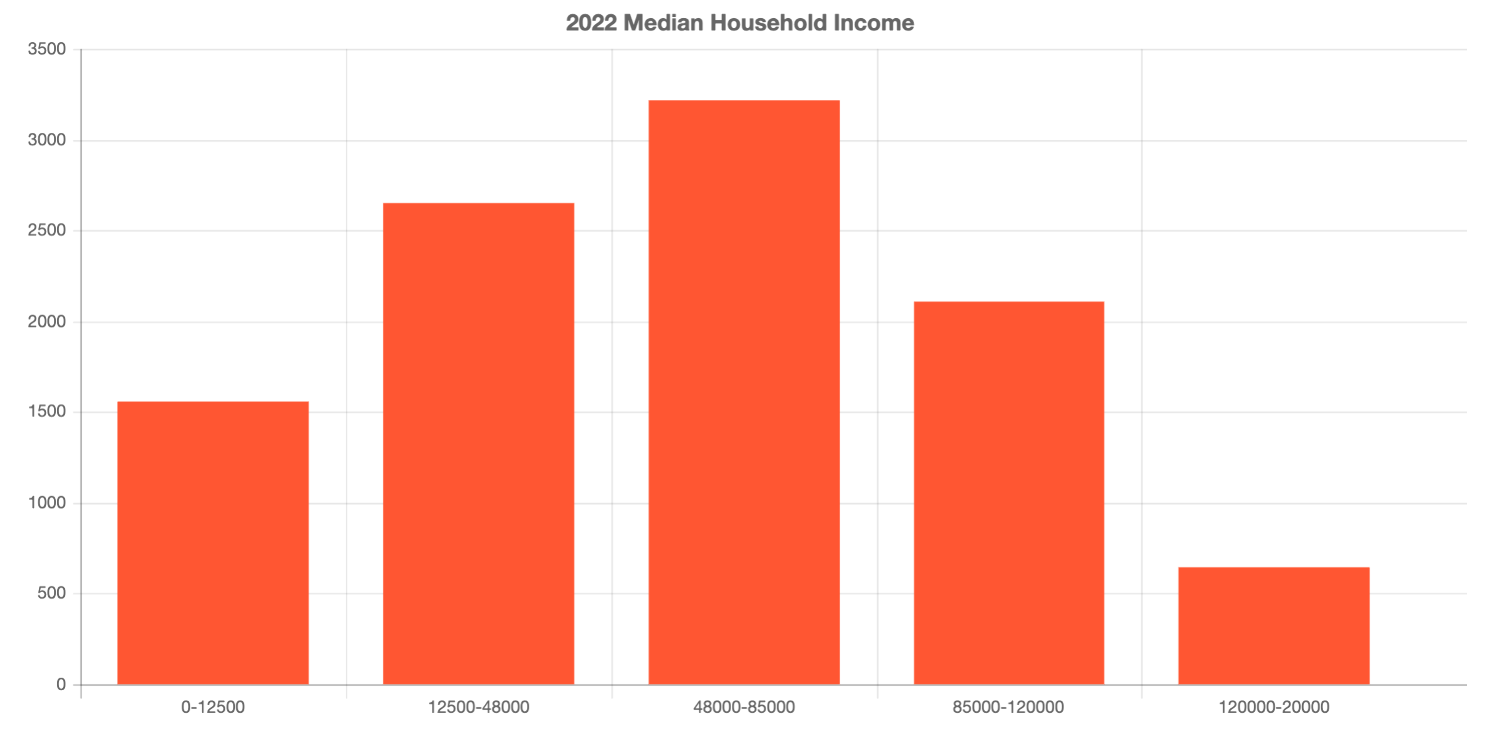
- See also
Constructors
Constructor
Parameters
| Parameter | Type | Description | Required |
|---|---|---|---|
| properties | | |
Properties
| Property | Type | Class |
|---|---|---|
| | ||
declaredClass readonly inherited | ||
expression inherited | ||
expressionValueType inherited | ||
field inherited | ||
firstDayOfWeek inherited | ||
hideUpperBound inherited | ||
splitBy inherited | ||
stackBy inherited | ||
type readonly | "fixed-boundaries" | |
expression
A standardized SQL expression used to calculate the bins, rather than referencing a field. The specified SQL expression must evaluate to a numeric or date type.
Both field and the expression cannot be specified for the same bin. The expressionValueType property must be set to the expected data type
of the output from the expression.
- See also
Example
const binQuery = new AttributeBinsQuery({ binParameters: new AutoIntervalBinParameters({ numBins: 5, // the interval size for each bin // sql expression to calculate the bins based on the product of Quantity and SalesAmount expression: "Quantity * SalesAmount" expressionValueType: "double" })}); expressionValueType
- Type
- BinParameterFieldType | null | undefined
Specifies the expected data type of the output from the expression, based on the type of value the expression generates. The expression property must be set when this property is set.
- See also
Example
const binQuery = new AttributeBinsQuery({ binParameters: new AutoIntervalBinParameters({ numBins: 5, // the interval size for each bin // sql expression to calculate the bins based on the product of Quantity and SalesAmount expression: "Quantity * SalesAmount" expressionValueType: "double" })}); field
The field name used to calculate the bins. The expression property cannot be set when this property is set.
- See also
firstDayOfWeek
The first day of the week. This property is used to determine the start of the week for date-based bins. The default value is 7, representing Sunday, if no value is specified.
hideUpperBound
If true, the upperBoundary and bin fields will not be included in the attributes.
splitBy
- Type
- AttributeBinsGrouping | null | undefined
The splitBy parameter divides data into separate bins for each unique value in the categorical field. Each category will have different bin boundaries based on the data distribution within that category.
For example, when analyzing sales by region (e.g., Central, Northeast, etc.), splitBy will create separate bin ranges for each region, allowing the boundaries to adjust to the specific data distribution of each region.
The splitBy parameter is useful when the distribution of values within each category (e.g., branch or region) differs significantly, and you want each category’s binning to reflect its unique data range.
Field with many unique values are not appropriate for splitting bins into multiple series.
Example
// create bins based on the SalesTotal field, split by the Branch field.const binQuery = new AttributeBinsQuery({ binParameters: new AutoIntervalBinParameters({ numBins: 5, // the interval size for each bin field: "SalesTotal", splitBy: { // autocasts to AttributeBinsGrouping type: "field", value: "Branch" } })});const result = await layer.queryAttributeBins(binQuery); stackBy
- Type
- AttributeBinsGrouping | null | undefined
The stackBy parameter divides each bin into segments based on unique values from a categorical field, allowing you to compare multiple categories within the same bin
while keeping the bin boundaries consistent across all categories. This enables you to visualize or analyze the distribution of categories stacked together within the same range of values.
For example, with 3 bins based on total sales with ranges like $0 to $5000, $5001 to $10,000, and $10,001 to $15,000, setting stackBy = SalesRep will stack each sales rep's contribution
within the same bin range. The bin boundaries remain the same, and each segment within the bin shows how individual categories contribute to the total frequency or value.
Field with many unique values are not appropriate for splitting bins into multiple series.
Example
// create bins based on the SalesTotal field, stacked by the Month field.const binQuery = new AttributeBinsQuery({ binParameters: new AutoIntervalBinParameters({ numBins: 5, // the interval size for each bin field: "SalesTotal", stackBy: { value: "EXTRACT(MONTH from invoiceDate)", type: "expression", valueType: "double", alias: "Month" } })});const result = await layer.queryAttributeBins(binQuery);Methods
fromJSON
- Signature
-
fromJSON (json: any): any
Creates a new instance of this class and initializes it with values from a JSON object
generated from an ArcGIS product. The object passed into the input json
parameter often comes from a response to a query operation in the REST API or a
toJSON()
method from another ArcGIS product. See the Using fromJSON()
topic in the Guide for details and examples of when and how to use this function.
Parameters
| Parameter | Type | Description | Required |
|---|---|---|---|
| json | A JSON representation of the instance in the ArcGIS format. See the ArcGIS REST API documentation for examples of the structure of various input JSON objects. | |
- Returns
- any
Returns a new instance of this class.
clone
- Signature
-
clone (): this
Creates a deep clone of this object. Any properties that store values by reference will be assigned copies of the referenced values on the cloned instance.
- Returns
- this
A deep clone of the class instance that invoked this method.
toJSON
- Signature
-
toJSON (): any
Converts an instance of this class to its ArcGIS portal JSON representation. See the Using fromJSON() guide topic for more information.
- Returns
- any
The ArcGIS portal JSON representation of an instance of this class.