Load an ArcGIS tiled layer from a URL.
Use case
An ArcGISTiledLayer consumes raster tiles provided by an ArcGIS service or a tile package (.tpk & .tpkx). Dividing a raster into tiles provides the user with relevant tiles and level of detail while panning and zooming, allowing for rapid map visualization and navigation. For example, say you wanted an application with a map containing all museums in your city so that you could share this with tourists. Since only the museums would need to support being identifiable or queryable within the app, all other contextual information required to orient and direct the tourists could be sourced from a single ArcGIS tiled layer, leading to faster performance and minimizing the time to load the map.
How to use the sample
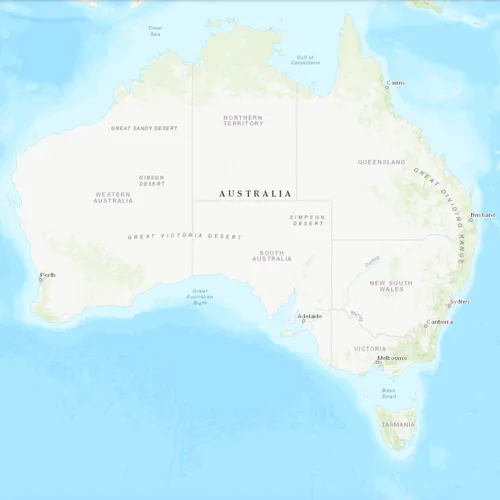
Launch the app to view the “World Topographic Map” tile layer as the basemap.
How it works
- Create a
ArcGISTiledLayerobject from a URL. - Create a
Basemappassing in the tiled layer. - Create a
Mapwith the basemap. - Set the map on the
MapView.
Relevant API
- Map
- ArcGISTiledLayer
- Basemap
- MapView
About the data
The application utilizes the “World Topographic Map” tile layer. This presents a simple yet powerful illustration of adding visualization context to a basemap through the use of an ArcGIS tiled layer.
Additional information
An ArcGISTiledLayer can also be added to the ArcGISMap as a layer, but it’s best practice to use as a basemap since its purpose is to provide geographical context. ArcGIS tiled layers do not support reprojection, query, select, identify, or editing.
Tags
basemap, layers, raster tiles, tiled layer, visualization
Sample code
// [WriteFile Name=ArcGISTiledLayerUrl, Category=Layers]// [Legal]// Copyright 2016 Esri.//// Licensed under the Apache License, Version 2.0 (the "License");// you may not use this file except in compliance with the License.// You may obtain a copy of the License at// http://www.apache.org/licenses/LICENSE-2.0//// Unless required by applicable law or agreed to in writing, software// distributed under the License is distributed on an "AS IS" BASIS,// WITHOUT WARRANTIES OR CONDITIONS OF ANY KIND, either express or implied.// See the License for the specific language governing permissions and// limitations under the License.// [Legal]
#ifdef PCH_BUILD#include "pch.hpp"#endif // PCH_BUILD
// sample headers#include "ArcGISTiledLayerUrl.h"
// ArcGIS Maps SDK headers#include "ArcGISTiledLayer.h"#include "Basemap.h"#include "Map.h"#include "MapQuickView.h"
// Qt headers#include <QUrl>
using namespace Esri::ArcGISRuntime;
ArcGISTiledLayerUrl::ArcGISTiledLayerUrl(QQuickItem* parent) :  QQuickItem(parent){}
ArcGISTiledLayerUrl::~ArcGISTiledLayerUrl() = default;
void ArcGISTiledLayerUrl::init(){  qmlRegisterType<MapQuickView>("Esri.Samples", 1, 0, "MapView");  qmlRegisterType<ArcGISTiledLayerUrl>("Esri.Samples", 1, 0, "ArcGISTiledLayerUrlSample");}
void ArcGISTiledLayerUrl::componentComplete(){  QQuickItem::componentComplete();
  // find QML MapView component  m_mapView = findChild<MapQuickView*>("mapView");
  //! [display tiled layer from tiled map service]  // create a new tiled layer  ArcGISTiledLayer* tiledLayer = new ArcGISTiledLayer(QUrl("https://services.arcgisonline.com/arcgis/rest/services/World_Topo_Map/MapServer"), this);  // create a new basemap instance with the tiled layer  Basemap* basemap = new Basemap(tiledLayer, this);  // create a new map instance  m_map = new Map(basemap, this);  // set map on the map view  m_mapView->setMap(m_map);  //! [display tiled layer from tiled map service]}
// [WriteFile Name=ArcGISTiledLayerUrl, Category=Layers]// [Legal]// Copyright 2016 Esri.//// Licensed under the Apache License, Version 2.0 (the "License");// you may not use this file except in compliance with the License.// You may obtain a copy of the License at// http://www.apache.org/licenses/LICENSE-2.0//// Unless required by applicable law or agreed to in writing, software// distributed under the License is distributed on an "AS IS" BASIS,// WITHOUT WARRANTIES OR CONDITIONS OF ANY KIND, either express or implied.// See the License for the specific language governing permissions and// limitations under the License.// [Legal]
#ifndef ARCGIS_TILED_LAYER_URL_H#define ARCGIS_TILED_LAYER_URL_H
// Qt headers#include <QQuickItem>
namespace Esri::ArcGISRuntime{ class Map; class MapQuickView;}
class ArcGISTiledLayerUrl : public QQuickItem{ Q_OBJECT
public: explicit ArcGISTiledLayerUrl(QQuickItem* parent = nullptr); ~ArcGISTiledLayerUrl() override;
void componentComplete() override; static void init();
private: Esri::ArcGISRuntime::Map* m_map = nullptr; Esri::ArcGISRuntime::MapQuickView* m_mapView = nullptr;};
#endif // ARCGIS_TILED_LAYER_URL_H// [WriteFile Name=ArcGISTiledLayerUrl, Category=Layers]// [Legal]// Copyright 2016 Esri.//// Licensed under the Apache License, Version 2.0 (the "License");// you may not use this file except in compliance with the License.// You may obtain a copy of the License at// http://www.apache.org/licenses/LICENSE-2.0//// Unless required by applicable law or agreed to in writing, software// distributed under the License is distributed on an "AS IS" BASIS,// WITHOUT WARRANTIES OR CONDITIONS OF ANY KIND, either express or implied.// See the License for the specific language governing permissions and// limitations under the License.// [Legal]
import QtQuickimport QtQuick.Controlsimport Esri.Samples
ArcGISTiledLayerUrlSample { width: 800 height: 600
// add a mapView component MapView { anchors.fill: parent objectName: "mapView"
Component.onCompleted: { // Set the focus on MapView to initially enable keyboard navigation forceActiveFocus(); } }}