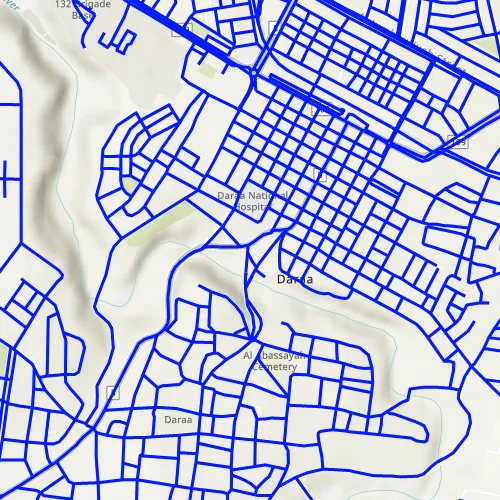
This sample demonstrates how to display an OGC API feature collection and query features while navigating the map view.
Use case
When panning the map view, it is necessary to query the OGC API feature table to obtain additional features within the new visible extent.
How to use the sample
Pan the map and observe how new features are loaded from the OGC API feature service.
How it works
-
Create an
OgcFeatureCollectionTableobject using a URL to an OGC API feature service and a collection ID. -
Set the feature table’s
FeatureRequestModetoManualCacheso features requested from the server are cached locally. -
Create a
FeatureLayerusing the feature table and add it to the Map’soperationalLayers. -
Every time the map view navigation completes:
i. Create
QueryParametersii. Set the parameter’s
Geometryto the current extent of the map view.iii. Set the parameter’s
SpatialRelationshiptoIntersects.iv. Set the
MaxFeaturesproperty to 5000 (some services have a low default value for maximum features).v. Call
OgcFeatureCollectionTable::PopulateFromServiceAsync()using the query parameters from the previous steps.
Relevant API
- OgcFeatureCollectionTable
- QueryParameters
Additional information
See the OGC API website for more information on the OGC API family of standards.
Tags
feature, feature layer, feature table, OGC, OGC API, service, table, web
Sample code
// [WriteFile Name=DisplayOgcApiFeatureCollection, Category=Layers]// [Legal]// Copyright 2021 Esri.//// Licensed under the Apache License, Version 2.0 (the "License");// you may not use this file except in compliance with the License.// You may obtain a copy of the License at// http://www.apache.org/licenses/LICENSE-2.0//// Unless required by applicable law or agreed to in writing, software// distributed under the License is distributed on an "AS IS" BASIS,// WITHOUT WARRANTIES OR CONDITIONS OF ANY KIND, either express or implied.// See the License for the specific language governing permissions and// limitations under the License.// [Legal]
#ifdef PCH_BUILD#include "pch.hpp"#endif // PCH_BUILD
// sample headers#include "DisplayOgcApiFeatureCollection.h"
// ArcGIS Maps SDK headers#include "CoreTypes.h"#include "FeatureLayer.h"#include "GeodatabaseTypes.h"#include "Geometry.h"#include "LayerListModel.h"#include "Map.h"#include "MapQuickView.h"#include "MapTypes.h"#include "OgcFeatureCollectionTable.h"#include "QueryParameters.h"#include "SimpleLineSymbol.h"#include "SimpleRenderer.h"#include "SymbolTypes.h"#include "Viewpoint.h"
// Qt headers#include <QFuture>
using namespace Esri::ArcGISRuntime;
DisplayOgcApiFeatureCollection::DisplayOgcApiFeatureCollection(QObject* parent /* = nullptr */):  QObject(parent),  m_map(new Map(BasemapStyle::ArcGISTopographic, this)){  const QUrl serviceUrl = QUrl("https://demo.ldproxy.net/daraa");  const QString collectionId = "TransportationGroundCrv";  m_ogcFeatureCollectionTable = new OgcFeatureCollectionTable(serviceUrl, collectionId, this);
  // FeatureRequestMode::ManualCache specifies that features from the server will be stored locally for display and querying  // In this mode, ServiceFeatureTable::populateFromService() must be called to populate the local cache  m_ogcFeatureCollectionTable->setFeatureRequestMode(FeatureRequestMode::ManualCache);
  // m_ogcFeatureCollectionTable->load() will be automatically called when added to a FeatureLayer  m_featureLayer = new FeatureLayer(m_ogcFeatureCollectionTable, this);  m_featureLayer->setRenderer(new SimpleRenderer(new SimpleLineSymbol(SimpleLineSymbolStyle::Solid, Qt::blue, 3, this), this));  m_map->operationalLayers()->append(m_featureLayer);}
DisplayOgcApiFeatureCollection::~DisplayOgcApiFeatureCollection() = default;
void DisplayOgcApiFeatureCollection::init(){  // Register the map view for QML  qmlRegisterType<MapQuickView>("Esri.Samples", 1, 0, "MapView");  qmlRegisterType<DisplayOgcApiFeatureCollection>("Esri.Samples", 1, 0, "DisplayOgcApiFeatureCollectionSample");}
MapQuickView* DisplayOgcApiFeatureCollection::mapView() const{  return m_mapView;}
// Set the view (created in QML)void DisplayOgcApiFeatureCollection::setMapView(MapQuickView* mapView){  if (!mapView || mapView == m_mapView)    return;
  m_mapView = mapView;  m_mapView->setMap(m_map);  m_mapView->setViewpointAsync(Viewpoint(32.62, 36.10, 20'000));
  createQueryConnection();
  emit mapViewChanged();}
void DisplayOgcApiFeatureCollection::createQueryConnection(){  connect(m_mapView, &MapQuickView::navigatingChanged, this, [this]()  {    if (m_mapView->isNavigating())      return;
    QueryParameters queryParameters = QueryParameters();    // Set the query area to what is currently visible in the map view    queryParameters.setGeometry(m_mapView->currentViewpoint(ViewpointType::BoundingGeometry).targetGeometry());    // SpatialRelationship::Intersects will return all features that are within and crossing the perimiter of the input geometry    queryParameters.setSpatialRelationship(SpatialRelationship::Intersects);    // Some services have low default values for max features returned    queryParameters.setMaxFeatures(5000);
    // Populate the feature collection table with features that match the parameters, cache them locally, and store all table fields    auto future = m_ogcFeatureCollectionTable->populateFromServiceAsync(queryParameters, false, {});    Q_UNUSED(future)  });}
// [WriteFile Name=DisplayOgcApiFeatureCollection, Category=Layers]// [Legal]// Copyright 2021 Esri.//// Licensed under the Apache License, Version 2.0 (the "License");// you may not use this file except in compliance with the License.// You may obtain a copy of the License at// http://www.apache.org/licenses/LICENSE-2.0//// Unless required by applicable law or agreed to in writing, software// distributed under the License is distributed on an "AS IS" BASIS,// WITHOUT WARRANTIES OR CONDITIONS OF ANY KIND, either express or implied.// See the License for the specific language governing permissions and// limitations under the License.// [Legal]
#ifndef DisplayOgcApiFeatureCollection_H#define DisplayOgcApiFeatureCollection_H
// ArcGIS Maps SDK headers#include "QueryParameters.h"
// Qt headers#include <QObject>
namespace Esri::ArcGISRuntime{class FeatureLayer;class Map;class MapQuickView;class OgcFeatureCollectionTable;class QueryParameters;}
Q_MOC_INCLUDE("MapQuickView.h")
class DisplayOgcApiFeatureCollection : public QObject{ Q_OBJECT
Q_PROPERTY(Esri::ArcGISRuntime::MapQuickView* mapView READ mapView WRITE setMapView NOTIFY mapViewChanged)
public: explicit DisplayOgcApiFeatureCollection(QObject* parent = nullptr); ~DisplayOgcApiFeatureCollection();
static void init();
signals: void mapViewChanged();
private: Esri::ArcGISRuntime::MapQuickView* mapView() const; void setMapView(Esri::ArcGISRuntime::MapQuickView* mapView); void createQueryConnection();
Esri::ArcGISRuntime::FeatureLayer* m_featureLayer = nullptr; Esri::ArcGISRuntime::Map* m_map = nullptr; Esri::ArcGISRuntime::MapQuickView* m_mapView = nullptr; Esri::ArcGISRuntime::OgcFeatureCollectionTable* m_ogcFeatureCollectionTable = nullptr;};
#endif // DisplayOgcApiFeatureCollection_H// [WriteFile Name=DisplayOgcApiFeatureCollection, Category=Layers]// [Legal]// Copyright 2021 Esri.//// Licensed under the Apache License, Version 2.0 (the "License");// you may not use this file except in compliance with the License.// You may obtain a copy of the License at// http://www.apache.org/licenses/LICENSE-2.0//// Unless required by applicable law or agreed to in writing, software// distributed under the License is distributed on an "AS IS" BASIS,// WITHOUT WARRANTIES OR CONDITIONS OF ANY KIND, either express or implied.// See the License for the specific language governing permissions and// limitations under the License.// [Legal]
import QtQuickimport QtQuick.Controlsimport Esri.Samples
Item {
// add a mapView component MapView { id: view anchors.fill: parent
Component.onCompleted: { // Set the focus on MapView to initially enable keyboard navigation forceActiveFocus(); } }
// Declare the C++ instance which creates the map etc. and supply the view DisplayOgcApiFeatureCollectionSample { id: model mapView: view }}