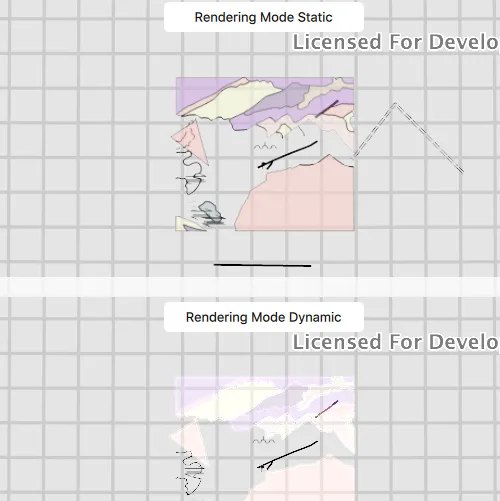
Render features in a scene statically or dynamically by setting the feature layer rendering mode.
Use case
In dynamic rendering mode, features and graphics are stored on the GPU. As a result, dynamic rendering mode is good for moving objects and for maintaining graphical fidelity during extent changes, since individual graphic changes can be efficiently applied directly to the GPU state. This gives the map or scene a seamless look and feel when interacting with it. The number of features and graphics has a direct impact on GPU resources, so large numbers of features or graphics can affect the responsiveness of maps or scenes to user interaction. Ultimately, the number and complexity of features and graphics that can be rendered in dynamic rendering mode is dependent on the power and memory of the device’s GPU.
In static rendering mode, features and graphics are rendered only when needed (for example, after an extent change) and offloads a significant portion of the graphical processing onto the CPU. As a result, less work is required by the GPU to draw the graphics, and the GPU can spend its resources on keeping the UI interactive. Use this mode for stationary graphics, complex geometries, and very large numbers of features or graphics. The number of features and graphics has little impact on frame render time, meaning it scales well, and pushes a constant GPU payload. However, rendering updates is CPU and system memory intensive, which can have an impact on device battery life.
How to use the sample
Click ‘Start Animation’ to begin the same zoom animation on both static and dynamicly rendered scenes.
How it works
- Create a
Sceneand callloadSettings()and thensetPreferred[Point/Polyline/Polygon]FeatureRenderingMode(...). - The
RenderingModecan be set toSTATIC,DYNAMICorAUTOMATIC.- In Static rendering mode, the number of features and graphics has little impact on frame render time, meaning it scales well, however points don’t stay screen-aligned and point/polyline/polygon objects are only redrawn once map view navigation is complete.
- In Dynamic rendering mode, large numbers of features or graphics can affect the responsiveness of maps or scenes to user interaction, however points remain screen-aligned and point/polyline/polygon objects are continually redrawn while the map view is navigating.
- When left to automatic rendering, points are drawn dynamically and polylines and polygons statically.
Relevant API
- Scene
- FeatureLayer
- FeatureLayer::renderingMode
- LoadSettings
- SceneView
Tags
3D, dynamic, feature layer, features, rendering, static
Sample code
// [WriteFile Name=FeatureLayerRenderingModeScene, Category=Layers]// [Legal]// Copyright 2017 Esri.//// Licensed under the Apache License, Version 2.0 (the "License");// you may not use this file except in compliance with the License.// You may obtain a copy of the License at// http://www.apache.org/licenses/LICENSE-2.0//// Unless required by applicable law or agreed to in writing, software// distributed under the License is distributed on an "AS IS" BASIS,// WITHOUT WARRANTIES OR CONDITIONS OF ANY KIND, either express or implied.// See the License for the specific language governing permissions and// limitations under the License.// [Legal]
#ifdef PCH_BUILD#include "pch.hpp"#endif // PCH_BUILD
// sample headers#include "FeatureLayerRenderingModeScene.h"
// ArcGIS Maps SDK headers#include "Camera.h"#include "FeatureLayer.h"#include "LayerListModel.h"#include "LoadSettings.h"#include "MapTypes.h"#include "Point.h"#include "Scene.h"#include "SceneQuickView.h"#include "ServiceFeatureTable.h"#include "SpatialReference.h"
// Qt headers#include <QFuture>#include <QString>#include <QStringList>#include <QTimer>
using namespace Esri::ArcGISRuntime;
FeatureLayerRenderingModeScene::FeatureLayerRenderingModeScene(QQuickItem* parent /* = nullptr */):  QQuickItem(parent){}
void FeatureLayerRenderingModeScene::init(){  // Register classes for QML  qmlRegisterType<SceneQuickView>("Esri.Samples", 1, 0, "SceneView");  qmlRegisterType<FeatureLayerRenderingModeScene>("Esri.Samples", 1, 0, "FeatureLayerRenderingModeSceneSample");}
void FeatureLayerRenderingModeScene::componentComplete(){  QQuickItem::componentComplete();
  // Create a scene for static rendering  m_topSceneView = findChild<SceneQuickView*>("topSceneView");  Scene* topScene = new Scene(this);  topScene->loadSettings()->setPreferredPointFeatureRenderingMode(FeatureRenderingMode::Static);  topScene->loadSettings()->setPreferredPolygonFeatureRenderingMode(FeatureRenderingMode::Static);  topScene->loadSettings()->setPreferredPolylineFeatureRenderingMode(FeatureRenderingMode::Static);  addFeatureLayers(topScene);  m_topSceneView->setArcGISScene(topScene);
  // Create a scene for dynamic rendering  m_bottomSceneView = findChild<SceneQuickView*>("bottomSceneView");  Scene* bottomScene = new Scene(this);  bottomScene->loadSettings()->setPreferredPointFeatureRenderingMode(FeatureRenderingMode::Dynamic);  bottomScene->loadSettings()->setPreferredPolygonFeatureRenderingMode(FeatureRenderingMode::Dynamic);  bottomScene->loadSettings()->setPreferredPolylineFeatureRenderingMode(FeatureRenderingMode::Dynamic);  addFeatureLayers(bottomScene);  m_bottomSceneView->setArcGISScene(bottomScene);
  // Create Zoom Out Camera Viewpoint  const Point outPoint(-118.37, 34.46, SpatialReference::wgs84());  const double outDistance = 42000.0;  const double outHeading = 0.0;  const double outPitch = 0.0;  const double outRoll = 0.0;  m_zoomOutCamera = Camera(outPoint, outDistance, outHeading, outPitch, outRoll);
  // Create Zoom In Camera Viewpoint  const Point inPoint(-118.45, 34.395, SpatialReference::wgs84());  const double inDistance = 2500.0;  const double inHeading = 90.0;  const double inPitch = 75.0;  const double inRoll = 0.0;  m_zoomInCamera = Camera(inPoint, inDistance, inHeading, inPitch, inRoll);
  // Set initial viewpoint  m_topSceneView->setViewpointCameraAndWait(m_zoomOutCamera);  m_bottomSceneView->setViewpointCameraAndWait(m_zoomOutCamera);
  // Create Timer  m_timer = new QTimer(this);  m_timer->setInterval(7000);  connect(m_timer, &QTimer::timeout, this, &FeatureLayerRenderingModeScene::animate);}
void FeatureLayerRenderingModeScene::addFeatureLayers(Scene* scene){  const QStringList layerIds = {"0", "8", "9"};  for (const QString& layerId : layerIds)  {    QString featureServiceUrl = QString("%1/%2").arg(m_featureServiceUrl, layerId);    ServiceFeatureTable* featureTable = new ServiceFeatureTable(featureServiceUrl, this);    FeatureLayer* featureLayer = new FeatureLayer(featureTable, this);    scene->operationalLayers()->append(featureLayer);  }}
// update the Camera when the timer triggersvoid FeatureLayerRenderingModeScene::animate(){  Camera camera;  if (m_isZoomedOut)    camera = Camera(m_zoomInCamera);  else    camera = Camera(m_zoomOutCamera);
  m_bottomSceneView->setViewpointCameraAsync(camera, 5.0f);  m_topSceneView->setViewpointCameraAsync(camera, 5.0f);  m_isZoomedOut = !m_isZoomedOut;}
void FeatureLayerRenderingModeScene::startAnimation(){  if (!m_timer)    return;
  animate();  m_timer->start(7000);}
void FeatureLayerRenderingModeScene::stopAnimation(){  if (!m_timer)    return;
  m_timer->stop();}
// [WriteFile Name=FeatureLayerRenderingModeScene, Category=Layers]// [Legal]// Copyright 2017 Esri.//// Licensed under the Apache License, Version 2.0 (the "License");// you may not use this file except in compliance with the License.// You may obtain a copy of the License at// http://www.apache.org/licenses/LICENSE-2.0//// Unless required by applicable law or agreed to in writing, software// distributed under the License is distributed on an "AS IS" BASIS,// WITHOUT WARRANTIES OR CONDITIONS OF ANY KIND, either express or implied.// See the License for the specific language governing permissions and// limitations under the License.// [Legal]
#ifndef FEATURELAYERRENDERINGMODESCENE_H#define FEATURELAYERRENDERINGMODESCENE_H
// ArcGIS Maps SDK headers#include "Camera.h"
// Qt headers#include <QQuickItem>
namespace Esri::ArcGISRuntime{class SceneQuickView;class Scene;}
class QTimer;
class FeatureLayerRenderingModeScene : public QQuickItem{ Q_OBJECT
public: explicit FeatureLayerRenderingModeScene(QQuickItem* parent = nullptr); ~FeatureLayerRenderingModeScene() override = default;
void componentComplete() override; static void init();
Q_INVOKABLE void startAnimation(); Q_INVOKABLE void stopAnimation();
private slots: void animate();
private: void addFeatureLayers(Esri::ArcGISRuntime::Scene* scene);
Esri::ArcGISRuntime::SceneQuickView* m_topSceneView = nullptr; Esri::ArcGISRuntime::SceneQuickView* m_bottomSceneView = nullptr; Esri::ArcGISRuntime::Camera m_zoomOutCamera; Esri::ArcGISRuntime::Camera m_zoomInCamera; QTimer* m_timer = nullptr; const QString m_featureServiceUrl = "https://sampleserver6.arcgisonline.com/arcgis/rest/services/Energy/Geology/FeatureServer"; bool m_isZoomedOut = true;};
#endif // FEATURELAYERRENDERINGMODESCENE_H// [WriteFile Name=FeatureLayerRenderingModeScene, Category=Layers]// [Legal]// Copyright 2017 Esri.//// Licensed under the Apache License, Version 2.0 (the "License");// you may not use this file except in compliance with the License.// You may obtain a copy of the License at// http://www.apache.org/licenses/LICENSE-2.0//// Unless required by applicable law or agreed to in writing, software// distributed under the License is distributed on an "AS IS" BASIS,// WITHOUT WARRANTIES OR CONDITIONS OF ANY KIND, either express or implied.// See the License for the specific language governing permissions and// limitations under the License.// [Legal]
import QtQuickimport QtQuick.Controlsimport Esri.Samples
FeatureLayerRenderingModeSceneSample { id: rootRectangle clip: true width: 800 height: 600
SceneView { anchors { left: parent.left right: parent.right top: parent.top } height: parent.height / 2 objectName: "topSceneView"
Rectangle { anchors { horizontalCenter: parent.horizontalCenter top: parent.top margins: 5 } color: "white" radius: 5 width: 200 height: 30
Text { anchors.centerIn: parent text: "Rendering Mode Static" } } }
SceneView { anchors { left: parent.left right: parent.right bottom: parent.bottom } height: parent.height / 2 objectName: "bottomSceneView"
Rectangle { anchors { horizontalCenter: parent.horizontalCenter top: parent.top margins: 5 } color: "white" radius: 5 width: 200 height: 30
Text { anchors.centerIn: parent text: "Rendering Mode Dynamic" } } }
Button { anchors { left: parent.left top: parent.top margins: 10 } readonly property string startText: "Start Animation" readonly property string stopText: "Stop Animation" text: startText onClicked: { if (text === startText) { startAnimation(); text = stopText; } else { stopAnimation(); text = startText; } } }}