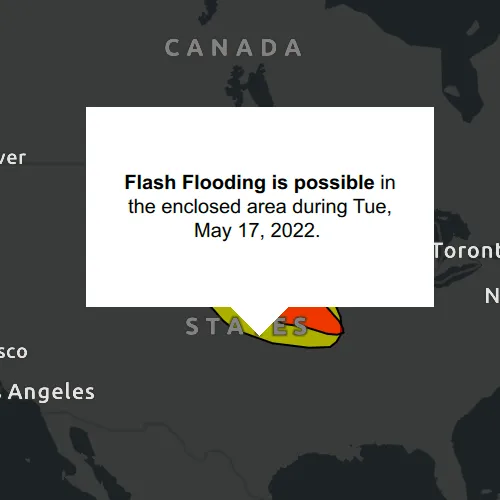
Show a callout with formatted content for a KML feature.
Use case
A user may wish to select a KML feature to view relevant information about it.
How to use the sample
Click a feature to identify it. Feature information will be displayed in a callout.
Note: the KML layer used in this sample contains a screen overlay. The screen overlay contains a legend and the logos for the National Oceanic and Atmospheric Administration (NOAA) and the National Weather Service (NWS). You can’t identify the screen overlay.
How it works
- Connect to the
MouseClickedevent on theMapView. - On click:
- Call
identifyLayerAsync(...)passing in theKmlLayer, screen point and tolerance. - Await the result of the identify and then get the
KmlPlacemarkfrom the result. - Create a callout at the calculated map point and populate the callout content with text from the placemark’s
BalloonContent. NOTE: KML supports defining HTML for balloon content and may need to be converted from HTML to text. - Show the callout.
Note: There are several types of KML features. This sample only identifies features of type KmlPlacemark.
Relevant API
- GeoView::identifyLayerAsync(…)
- IdentifyLayerResult
- KmlLayer
- KmlPlacemark
- KmlPlacemark::balloonContent()
About the data
This sample shows a forecast for significant weather within the U.S. Regions of severe thunderstorms, flooding, snowfall, and freezing rain are shown. Tap the features to see details.
Additional information
KML features can have rich HTML content, including images.
Tags
Keyhole, KML, KMZ, NOAA, NWS, OGC, weather
Sample code
// [WriteFile Name=IdentifyKmlFeatures, Category=Layers]// [Legal]// Copyright 2020 Esri.//// Licensed under the Apache License, Version 2.0 (the "License");// you may not use this file except in compliance with the License.// You may obtain a copy of the License at// http://www.apache.org/licenses/LICENSE-2.0//// Unless required by applicable law or agreed to in writing, software// distributed under the License is distributed on an "AS IS" BASIS,// WITHOUT WARRANTIES OR CONDITIONS OF ANY KIND, either express or implied.// See the License for the specific language governing permissions and// limitations under the License.// [Legal]
#ifdef PCH_BUILD#include "pch.hpp"#endif // PCH_BUILD
// sample headers#include "IdentifyKmlFeatures.h"
// ArcGIS Maps SDK headers#include "CalloutData.h"#include "Envelope.h"#include "IdentifyLayerResult.h"#include "KmlDataset.h"#include "KmlLayer.h"#include "KmlPlacemark.h"#include "LayerListModel.h"#include "Map.h"#include "MapQuickView.h"#include "MapTypes.h"#include "SpatialReference.h"
// Qt headers#include <QFuture>#include <QUuid>
using namespace Esri::ArcGISRuntime;
namespace{const QUrl datasetUrl("https://www.wpc.ncep.noaa.gov/kml/noaa_chart/WPC_Day1_SigWx_latest.kml");}
IdentifyKmlFeatures::IdentifyKmlFeatures(QObject* parent /* = nullptr */):  QObject(parent),  m_map(new Map(BasemapStyle::ArcGISDarkGray, this)){  // create new KML layer  KmlDataset* forecastDataset = new KmlDataset(datasetUrl, this);  m_forecastLayer = new KmlLayer(forecastDataset, this);  m_map->operationalLayers()->append(m_forecastLayer);}
IdentifyKmlFeatures::~IdentifyKmlFeatures() = default;
void IdentifyKmlFeatures::init(){  // Register the map view for QML  qmlRegisterType<MapQuickView>("Esri.Samples", 1, 0, "MapView");  qmlRegisterType<IdentifyKmlFeatures>("Esri.Samples", 1, 0, "IdentifyKmlFeaturesSample");}
MapQuickView* IdentifyKmlFeatures::mapView() const{  return m_mapView;}
// Set the view (created in QML)void IdentifyKmlFeatures::setMapView(MapQuickView* mapView){  if (!mapView || mapView == m_mapView)    return;
  m_mapView = mapView;  m_mapView->setMap(m_map);
  // start zoomed in over the US  m_mapView->setViewpointGeometryAsync(Envelope(-19195297.778679, 512343.939994, -3620418.579987, 8658913.035426, SpatialReference::webMercator()));
  // identify clicked features  connect(m_mapView, &MapQuickView::mouseClicked, this, [this](QMouseEvent& e)  {    m_clickedPoint = m_mapView->screenToLocation(e.position().x(), e.position().y());    m_mapView->identifyLayerAsync(m_forecastLayer, e.position(), 15, false)        .then(this, [this](IdentifyLayerResult* rawResult)    {      auto result = std::unique_ptr<IdentifyLayerResult>(rawResult);
      // if not clicked on KML feature then close callout      if (result->geoElements().length() < 1)      {        m_mapView->calloutData()->setVisible(false);        return;      }
      // find the first geoElement that is a KML placemark      const auto elements = result->geoElements();      for (GeoElement* geoElement : elements)      {        if (KmlPlacemark* placemark = dynamic_cast<KmlPlacemark*>(geoElement))        {          // Google Earth only displays the placemarks with description or extended data. To          // match its behavior, add a description placeholder if the data source is empty          if (placemark->description().isEmpty())            placemark->setDescription("Weather condition");
          m_calloutText = placemark->balloonContent();          m_mapView->calloutData()->setLocation(m_clickedPoint);          m_mapView->calloutData()->setVisible(true);
          emit calloutDataChanged();          emit calloutTextChanged();          return;        }      }    });  });
  emit mapViewChanged();}
CalloutData* IdentifyKmlFeatures::calloutData() const{  return m_calloutData;}
QString IdentifyKmlFeatures::calloutText() const{  return m_calloutText;}
// [WriteFile Name=IdentifyKmlFeatures, Category=Layers]// [Legal]// Copyright 2020 Esri.//// Licensed under the Apache License, Version 2.0 (the "License");// you may not use this file except in compliance with the License.// You may obtain a copy of the License at// http://www.apache.org/licenses/LICENSE-2.0//// Unless required by applicable law or agreed to in writing, software// distributed under the License is distributed on an "AS IS" BASIS,// WITHOUT WARRANTIES OR CONDITIONS OF ANY KIND, either express or implied.// See the License for the specific language governing permissions and// limitations under the License.// [Legal]
#ifndef IDENTIFYKMLFEATURES_H#define IDENTIFYKMLFEATURES_H
// ArcGIS Maps SDK headers#include "Point.h"
// Qt headers#include <QObject>#include <QString>
namespace Esri::ArcGISRuntime{class CalloutData;class KmlLayer;class Map;class MapQuickView;}
Q_MOC_INCLUDE("MapQuickView.h")Q_MOC_INCLUDE("CalloutData.h")
class IdentifyKmlFeatures : public QObject{ Q_OBJECT
Q_PROPERTY(Esri::ArcGISRuntime::MapQuickView* mapView READ mapView WRITE setMapView NOTIFY mapViewChanged) Q_PROPERTY(Esri::ArcGISRuntime::CalloutData* calloutData READ calloutData NOTIFY calloutDataChanged) Q_PROPERTY(QString calloutText READ calloutText NOTIFY calloutTextChanged)
public: explicit IdentifyKmlFeatures(QObject* parent = nullptr); ~IdentifyKmlFeatures();
static void init();
signals: void mapViewChanged(); void calloutDataChanged(); void calloutTextChanged();
private: Esri::ArcGISRuntime::MapQuickView* mapView() const; void setMapView(Esri::ArcGISRuntime::MapQuickView* mapView); Esri::ArcGISRuntime::CalloutData* calloutData() const; QString calloutText() const;
Esri::ArcGISRuntime::Map* m_map = nullptr; Esri::ArcGISRuntime::MapQuickView* m_mapView = nullptr; Esri::ArcGISRuntime::CalloutData* m_calloutData = nullptr; Esri::ArcGISRuntime::KmlLayer* m_forecastLayer = nullptr; Esri::ArcGISRuntime::Point m_clickedPoint; QString m_calloutText;};
#endif // IDENTIFYKMLFEATURES_H// [WriteFile Name=IdentifyKmlFeatures, Category=Layers]// [Legal]// Copyright 2020 Esri.//// Licensed under the Apache License, Version 2.0 (the "License");// you may not use this file except in compliance with the License.// You may obtain a copy of the License at// http://www.apache.org/licenses/LICENSE-2.0//// Unless required by applicable law or agreed to in writing, software// distributed under the License is distributed on an "AS IS" BASIS,// WITHOUT WARRANTIES OR CONDITIONS OF ANY KIND, either express or implied.// See the License for the specific language governing permissions and// limitations under the License.// [Legal]
import QtQuickimport QtQuick.Controlsimport Esri.Samplesimport Esri.ArcGISRuntime.Toolkit
Item {
// add a mapView component MapView { id: view anchors.fill: parent
Component.onCompleted: { // Set the focus on MapView to initially enable keyboard navigation forceActiveFocus(); }
Callout { id: callout calloutData: view.calloutData implicitWidth: 150 implicitHeight: contentText.implicitHeight + (contentText.implicitHeight * .05) contentItem: Label { id: contentText text: model.calloutText wrapMode: Text.WordWrap textFormat: Text.RichText horizontalAlignment: Qt.AlignHCenter verticalAlignment: Qt.AlignVCenter } } }
// Declare the C++ instance which creates the map etc. and supply the view IdentifyKmlFeaturesSample { id: model mapView: view }}