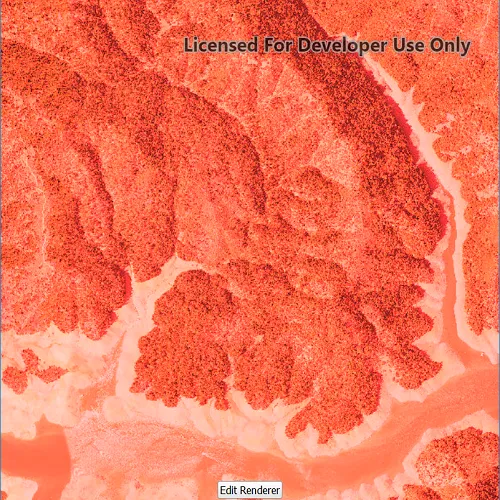
Apply an RGB renderer to a raster layer to enhance feature visibility.
Use case
An RGB renderer is used to adjust the color bands of a multispectral image. Remote sensing images acquired from satellites often contain values representing the reflection of multiple spectrums of light. Changing the RGB renderer of such rasters can be used to differentiate and highlight particular features that reflect light differently, such as different vegetation types, or turbidity in water.
How to use the sample
Tap on “Edit renderer” to change the settings for the rgb renderer. The sample allows you to change the stretch type and the parameters for each type. You can tap on the “Render” button to update the raster.
- Create a
Rasterfrom a from a multispectral raster file. - Create a
RasterLayerfrom the raster. - Create a
Basemapfrom the raster layer and set it to the map. - Create an
RGBRenderer, specifying theStretchParametersand other properties. - Set the
Rendereron the raster layer withrasterLayer::setRenderer(renderer).
Relevant API
- Basemap
- Raster
- RasterLayer
- RGBRenderer
- StretchParameters
Offline Data
Read more about how to set up the sample’s offline data here.
| Link | Local Location |
|---|---|
| Shasta.tif raster | <userhome>/ArcGIS/Runtime/Data/raster/Shasta.tif |
About the data
The raster used in this sample shows an area in the south of the Shasta-Trinity National Forest, California.
Tags
analysis, color, composite, imagery, multiband, multispectral, pan-sharpen, photograph, raster, spectrum, stretch, visualization
Sample code
// [WriteFile Name=RasterRgbRenderer, Category=Layers]// [Legal]// Copyright 2017 Esri.//// Licensed under the Apache License, Version 2.0 (the "License");// you may not use this file except in compliance with the License.// You may obtain a copy of the License at// http://www.apache.org/licenses/LICENSE-2.0//// Unless required by applicable law or agreed to in writing, software// distributed under the License is distributed on an "AS IS" BASIS,// WITHOUT WARRANTIES OR CONDITIONS OF ANY KIND, either express or implied.// See the License for the specific language governing permissions and// limitations under the License.// [Legal]
#ifdef PCH_BUILD#include "pch.hpp"#endif // PCH_BUILD
// sample headers#include "RasterRgbRenderer.h"
// ArcGIS Maps SDK headers#include "Basemap.h"#include "Map.h"#include "MapQuickView.h"#include "MapViewTypes.h"#include "MinMaxStretchParameters.h"#include "PercentClipStretchParameters.h"#include "RGBRenderer.h"#include "Raster.h"#include "RasterLayer.h"#include "StandardDeviationStretchParameters.h"
// Qt headers#include <QStandardPaths>#include <QtCore/qglobal.h>
using namespace Esri::ArcGISRuntime;
// helper method to get cross platform data pathnamespace{  QString defaultDataPath()  {    QString dataPath;
  #ifdef Q_OS_IOS    dataPath = QStandardPaths::writableLocation(QStandardPaths::DocumentsLocation);  #else    dataPath = QStandardPaths::writableLocation(QStandardPaths::HomeLocation);  #endif
    return dataPath;  }} // namespace
RasterRgbRenderer::RasterRgbRenderer(QQuickItem* parent /* = nullptr */):  QQuickItem(parent),  m_dataPath(defaultDataPath() + "/ArcGIS/Runtime/Data/raster"){}
RasterRgbRenderer::~RasterRgbRenderer() = default;
void RasterRgbRenderer::init(){  // Register the map view for QML  qmlRegisterType<MapQuickView>("Esri.Samples", 1, 0, "MapView");  qmlRegisterType<RasterRgbRenderer>("Esri.Samples", 1, 0, "RasterRgbRendererSample");}
void RasterRgbRenderer::componentComplete(){  QQuickItem::componentComplete();
  // find QML MapView component  m_mapView = findChild<MapQuickView*>("mapView");  m_mapView->setWrapAroundMode(WrapAroundMode::Disabled);
  // Create the raster and raster layer  Raster* raster = new Raster(m_dataPath + "/Shasta.tif", this);  m_rasterLayer = new RasterLayer(raster, this);
  // Add the raster to the map  Basemap* basemap = new Basemap(m_rasterLayer, this);  Map* map = new Map(basemap, this);  m_mapView->setMap(map);}
void RasterRgbRenderer::applyMinMax(double min0, double min1, double min2, double max0, double max1, double max2){  MinMaxStretchParameters stretchParams(QList<double>{min0, min1, min2}, QList<double>{max0, max1, max2});  RGBRenderer* renderer = new RGBRenderer(stretchParams, this);  m_rasterLayer->setRenderer(renderer);}
void RasterRgbRenderer::applyPercentClip(double min, double max){  PercentClipStretchParameters stretchParams(min, max);  RGBRenderer* renderer = new RGBRenderer(stretchParams, this);  m_rasterLayer->setRenderer(renderer);}
void RasterRgbRenderer::applyStandardDeviation(double factor){  StandardDeviationStretchParameters stretchParams(factor);  RGBRenderer* renderer = new RGBRenderer(stretchParams, this);  m_rasterLayer->setRenderer(renderer);}
// [WriteFile Name=RasterRgbRenderer, Category=Layers]// [Legal]// Copyright 2017 Esri.//// Licensed under the Apache License, Version 2.0 (the "License");// you may not use this file except in compliance with the License.// You may obtain a copy of the License at// http://www.apache.org/licenses/LICENSE-2.0//// Unless required by applicable law or agreed to in writing, software// distributed under the License is distributed on an "AS IS" BASIS,// WITHOUT WARRANTIES OR CONDITIONS OF ANY KIND, either express or implied.// See the License for the specific language governing permissions and// limitations under the License.// [Legal]
#ifndef RGBRENDERER_H#define RGBRENDERER_H
// Qt headers#include <QQuickItem>
namespace Esri::ArcGISRuntime{ class Map; class MapQuickView; class RasterLayer;}
class RasterRgbRenderer : public QQuickItem{ Q_OBJECT
public: explicit RasterRgbRenderer(QQuickItem* parent = nullptr); ~RasterRgbRenderer() override;
static void init();
void componentComplete() override;
Q_INVOKABLE void applyMinMax(double min0, double min1, double min2, double max0, double max1, double max2); Q_INVOKABLE void applyPercentClip(double min, double max); Q_INVOKABLE void applyStandardDeviation(double factor);
private: Esri::ArcGISRuntime::Map* m_map = nullptr; Esri::ArcGISRuntime::MapQuickView* m_mapView = nullptr; Esri::ArcGISRuntime::RasterLayer* m_rasterLayer = nullptr; QString m_dataPath;};
#endif // RGBRENDERER_H// [WriteFile Name=RasterRgbRenderer, Category=Layers]// [Legal]// Copyright 2017 Esri.//// Licensed under the Apache License, Version 2.0 (the "License");// you may not use this file except in compliance with the License.// You may obtain a copy of the License at// http://www.apache.org/licenses/LICENSE-2.0//// Unless required by applicable law or agreed to in writing, software// distributed under the License is distributed on an "AS IS" BASIS,// WITHOUT WARRANTIES OR CONDITIONS OF ANY KIND, either express or implied.// See the License for the specific language governing permissions and// limitations under the License.// [Legal]
import QtQuickimport QtQuick.Layoutsimport QtQuick.Controlsimport Esri.Samples
RasterRgbRendererSample { id: rootRectangle clip: true width: 800 height: 600
readonly property string minMax: "Min Max" readonly property string percentClip: "Percent Clip" readonly property string stdDeviation: "Standard Deviation" readonly property var stretchTypes: [minMax, percentClip, stdDeviation] property bool editingRenderer: false property string selectedType: stretchTypeCombo.currentText
states: [ State { name: "orientHorizontal" when: width > height PropertyChanges { target: layout flow: GridLayout.LeftToRight labelAlignment: Qt.AlignRight columns: 4 } }, State { name: "orientVertical" when: width <= height PropertyChanges { target: layout flow: GridLayout.TopToBottom labelAlignment: Qt.AlignLeft rows: 4 } } ]
// add a mapView component MapView { anchors.fill: parent objectName: "mapView"
Component.onCompleted: { // Set the focus on MapView to initially enable keyboard navigation forceActiveFocus(); } }
Rectangle { visible: editButton.visible anchors.centerIn: editButton radius: 8 height: editButton.height + 16 width: editButton.width + 16 color: "lightgrey" border.color: "darkgrey" border.width: 2 opacity: 0.75 }
Button { id: editButton anchors { bottom: parent.bottom horizontalCenter: parent.horizontalCenter margins: 32 } visible: rendererBox.width === 0 text: "Edit Renderer" onClicked: editingRenderer = true; }
Rectangle { id: rendererBox clip: true anchors { right: parent.right top: parent.top bottom: parent.bottom }
color: "white" opacity: 0.75 width: editingRenderer ? parent.width : 0 visible: width > 0
ComboBox { id: stretchTypeCombo anchors { bottom: layout.top left: layout.left right: layout.right margins: 5 }
model: stretchTypes property int modelWidth: 0 Layout.minimumWidth: modelWidth + leftPadding + rightPadding + (indicator ? indicator.width : 10) Component.onCompleted : { for (let i = 0; i < model.length; ++i) { metrics.text = model[i]; modelWidth = Math.max(modelWidth, metrics.width); } } TextMetrics { id: metrics font: stretchTypeCombo.font } }
GridLayout { id: layout property int labelAlignment anchors { centerIn: parent margins: 24 }
Text { text: "Min" Layout.alignment: layout.labelAlignment visible: selectedType === minMax }
Repeater { id: minMaxMin model: 3 SpinBox { editable: true visible: selectedType === minMax from: 0 to: 255 value: from } }
Text { text: "Max" Layout.alignment: layout.labelAlignment visible: selectedType === minMax }
Repeater { id: minMaxMax model: 3 SpinBox { editable: true visible: selectedType === minMax from: 0 to: 255 value: to } }
Text { text: "Min" Layout.alignment: layout.labelAlignment visible: selectedType === percentClip }
SpinBox { id: percentClipMin editable: true visible: selectedType === percentClip Layout.columnSpan: 3 from: 0 to: 100 value: from }
Text { text: "Max" Layout.alignment: layout.labelAlignment visible: selectedType === percentClip }
SpinBox { id: percentClipMax editable: true visible: selectedType === percentClip Layout.columnSpan: 3 from: 0 to: 100 value: to }
Text { text: "Factor" Layout.alignment: layout.labelAlignment visible: selectedType === stdDeviation }
SpinBox { id: sdFactor editable: true visible: selectedType === stdDeviation Layout.columnSpan: 3 property int decimals: 2 property real realValue: value / 100 from: 0 to: 25 * 100 value: 0
validator: DoubleValidator { bottom: Math.min(sdFactor.from, sdFactor.to) top: Math.min(sdFactor.from, sdFactor.to) }
textFromValue: function(value, locale) { return Number(value / 100).toLocaleString(locale, 'f', sdFactor.decimals); }
valueFromText: function(text, locale) { return Number.fromLocaleString(locale, text) * 100; } } }
Button { text: "Render" anchors { top: layout.bottom left: layout.left right: layout.right margins: 5 } onClicked: { editingRenderer = false; applyRendererSettings(); } }
Behavior on width { PropertyAnimation { duration: 500 } } }
function applyRendererSettings(){ if (selectedType === minMax){ applyMinMax(minMaxMin.itemAt(0).value, minMaxMin.itemAt(1).value, minMaxMin.itemAt(2).value, minMaxMax.itemAt(0).value, minMaxMax.itemAt(1).value, minMaxMax.itemAt(2).value); } else if (selectedType === percentClip){ applyPercentClip(percentClipMin.value, 100 - percentClipMax.value); } else if (selectedType === stdDeviation){ applyStandardDeviation(sdFactor.realValue); } }}