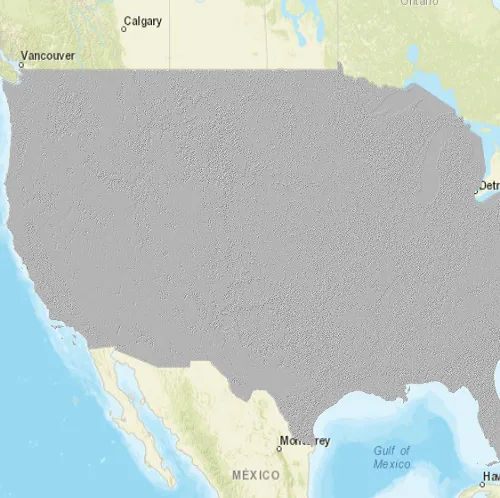
Load a raster from a service, then apply a function to it.
Use case
Raster functions allow processing operations that can be applied to one or more rasters on the fly. Functions can be applied to rasters that come from a service. A land survey agency may apply hillshade and aspect functions to rasters with elevation data in order to better determine the topography of a landscape and to make further planning decisions.
How to use the sample
The raster function is applied automatically when the sample starts and the result is displayed.
How it works
- Create the
ImageServiceRasterreferring to the image server URL. - Create the
RasterFunctionfrom a JSON string. - Set the raster argument with
rasterFunction::setRaster(rasterName, imageServiceRaster). - Create a new
Rasterreferring to the raster function. - Create a
RasterLayerto visualize the computed raster. - Display the raster.
Relevant API
- ImageServiceRaster
- Raster
- RasterFunction
- RasterFunctionArguments
- RasterLayer
About the data
The sample applies a hillshade function to a raster produced from the National Land Cover Database, NLCDLandCover2001. You can learn more about the hillshade function in the ArcMap documentation.
Additional information
The raster function computation happens locally on the client device.
Tags
function, layer, raster, raster function, service
Sample code
// [WriteFile Name=RasterFunctionService, Category=Layers]// [Legal]// Copyright 2017 Esri.//// Licensed under the Apache License, Version 2.0 (the "License");// you may not use this file except in compliance with the License.// You may obtain a copy of the License at// http://www.apache.org/licenses/LICENSE-2.0//// Unless required by applicable law or agreed to in writing, software// distributed under the License is distributed on an "AS IS" BASIS,// WITHOUT WARRANTIES OR CONDITIONS OF ANY KIND, either express or implied.// See the License for the specific language governing permissions and// limitations under the License.// [Legal]
#ifdef PCH_BUILD#include "pch.hpp"#endif // PCH_BUILD
// sample headers#include "RasterFunctionService.h"
// ArcGIS Maps SDK headers#include "ArcGISImageServiceInfo.h"#include "Basemap.h"#include "Envelope.h"#include "Error.h"#include "ImageServiceRaster.h"#include "LayerListModel.h"#include "Map.h"#include "MapQuickView.h"#include "MapTypes.h"#include "MapViewTypes.h"#include "Point.h"#include "RasterFunction.h"#include "RasterFunctionArguments.h"#include "RasterLayer.h"#include "Viewpoint.h"
// Qt headers#include <QFile>#include <QFuture>#include <QStandardPaths>#include <QtCore/qglobal.h>
using namespace Esri::ArcGISRuntime;
// helper method to get cross platform data pathnamespace{  QString defaultDataPath()  {    QString dataPath;
  #ifdef Q_OS_IOS    dataPath = QStandardPaths::writableLocation(QStandardPaths::DocumentsLocation);  #else    dataPath = QStandardPaths::writableLocation(QStandardPaths::HomeLocation);  #endif
    return dataPath;  }} // namespace
RasterFunctionService::RasterFunctionService(QQuickItem* parent /* = nullptr */):  QQuickItem(parent){}
void RasterFunctionService::init(){  // Register the map view for QML  qmlRegisterType<MapQuickView>("Esri.Samples", 1, 0, "MapView");  qmlRegisterType<RasterFunctionService>("Esri.Samples", 1, 0, "RasterFunctionServiceSample");}
void RasterFunctionService::componentComplete(){  QQuickItem::componentComplete();
  m_dataPath = defaultDataPath() + "/ArcGIS/Runtime/Data/raster";
  // find QML MapView component  m_mapView = findChild<MapQuickView*>("mapView");  m_mapView->setWrapAroundMode(WrapAroundMode::Disabled);
  // create a new tiled layer to add a basemap  m_map = new Map(BasemapStyle::ArcGISStreets, this);  m_mapView->setMap(m_map);
  // create an image service raster  m_imageServiceRaster = new ImageServiceRaster(QUrl("https://sampleserver6.arcgisonline.com/arcgis/rest/services/NLCDLandCover2001/ImageServer"), this);  // zoom to the raster's extent once it's loaded  connect(m_imageServiceRaster, &ImageServiceRaster::doneLoading, this, [this]()  {    constexpr double scale = 50000000.;    Viewpoint vpCenter = Viewpoint(m_imageServiceRaster->serviceInfo().fullExtent().center(), scale);    m_mapView->setViewpointAsync(vpCenter);  });
  // create a raster layer using the image service raster  m_rasterLayer = new RasterLayer(m_imageServiceRaster, this);  // add the raster layer to the map's operational layers  m_map->operationalLayers()->append(m_rasterLayer);}
void RasterFunctionService::applyRasterFunction(){  if (!QFile::exists(m_dataPath + "/hillshade_simplified.json"))  {    qDebug() << "JSON file for the raster function does not exist.";    return;  }
  //! [ImageServiceRaster Apply a raster function]  RasterFunction* rasterFunction = new RasterFunction(m_dataPath + "/hillshade_simplified.json", this);  RasterFunctionArguments* arguments = rasterFunction->arguments();  arguments->setRaster("raster", m_imageServiceRaster);
  // create a new raster with the raster function and add to the operational layer  Raster* raster = new Raster(rasterFunction, this);  RasterLayer* rasterLayer = new RasterLayer(raster, this);  //! [ImageServiceRaster Apply a raster function]
  m_map->operationalLayers()->clear();  //! [ImageServiceRaster cpp add raster operational]  m_map->operationalLayers()->append(rasterLayer);  //! [ImageServiceRaster cpp add raster operational]}
// [WriteFile Name=RasterFunctionService, Category=Layers]// [Legal]// Copyright 2017 Esri.//// Licensed under the Apache License, Version 2.0 (the "License");// you may not use this file except in compliance with the License.// You may obtain a copy of the License at// http://www.apache.org/licenses/LICENSE-2.0//// Unless required by applicable law or agreed to in writing, software// distributed under the License is distributed on an "AS IS" BASIS,// WITHOUT WARRANTIES OR CONDITIONS OF ANY KIND, either express or implied.// See the License for the specific language governing permissions and// limitations under the License.// [Legal]
#ifndef RASTERFUNCTIONSERVICE_H#define RASTERFUNCTIONSERVICE_H
// Qt headers#include <QQuickItem>
namespace Esri::ArcGISRuntime{ class Basemap; class Map; class MapQuickView; class ImageServiceRaster; class RasterLayer;}
class RasterFunctionService : public QQuickItem{ Q_OBJECT
public: explicit RasterFunctionService(QQuickItem* parent = nullptr); ~RasterFunctionService() override = default;
static void init(); Q_INVOKABLE void applyRasterFunction();
void componentComplete() override;
private:
Esri::ArcGISRuntime::Map* m_map = nullptr; Esri::ArcGISRuntime::MapQuickView* m_mapView = nullptr; Esri::ArcGISRuntime::ImageServiceRaster* m_imageServiceRaster = nullptr; Esri::ArcGISRuntime::RasterLayer* m_rasterLayer = nullptr; QString m_dataPath;};
#endif // RASTERFUNCTIONSERVICE_H// [WriteFile Name=RasterFunctionService, Category=Layers]// [Legal]// Copyright 2017 Esri.//// Licensed under the Apache License, Version 2.0 (the "License");// you may not use this file except in compliance with the License.// You may obtain a copy of the License at// http://www.apache.org/licenses/LICENSE-2.0//// Unless required by applicable law or agreed to in writing, software// distributed under the License is distributed on an "AS IS" BASIS,// WITHOUT WARRANTIES OR CONDITIONS OF ANY KIND, either express or implied.// See the License for the specific language governing permissions and// limitations under the License.// [Legal]
import QtQuickimport QtQuick.Controlsimport Esri.Samples
RasterFunctionServiceSample { id: rootRectangle clip: true width: 800 height: 600
// add a mapView component MapView { anchors.fill: parent objectName: "mapView"
Component.onCompleted: { // Set the focus on MapView to initially enable keyboard navigation forceActiveFocus(); } }
// Create a button to apply the raster function Rectangle { id: button property bool pressed: false
anchors { right: parent.right bottom: parent.bottom rightMargin: 20 bottomMargin: 40 }
width: 45 height: width color: pressed ? "#959595" : "#D6D6D6" radius: 100 border { color: "#585858" width: 1 }
Image { anchors { centerIn: parent } width: 26 height: width source: "qrc:/Samples/Layers/RasterFunctionService/RasterImageAnalysisHillshade.png" }
MouseArea { anchors.fill: parent onPressed: button.pressed = true onReleased: button.pressed = false onClicked: applyRasterFunction() } }}