Apply a raster function to a local raster file and display the output with a raster layer.
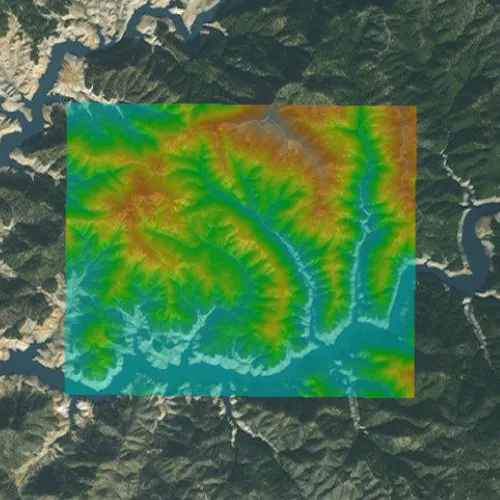
Use case
Raster functions allow processing operations that can be applied to one or more rasters on the fly. A land survey agency may apply hillshade and aspect functions to rasters with elevation data in order to better determine the topography of a landscape and to make further planning decisions.
How to use the sample
Load the sample to see a raster function applied to a raster.
How it works
- Create a
RasterFunctionusing the path to a local raster function JSON file. - Set the raster function arguments as required by the function used.
- Use the raster function to create a new
Raster. - Set the raster to a
RasterLayerand display it in theMap.
Relevant API
- Raster
- RasterFunction
- RasterLayer
Offline Data
Read more about how to set up the sample’s offline data here.
| Link | Local Location |
|---|---|
| Shasta.tif raster | <userhome>/ArcGIS/Runtime/Data/raster/Shasta_Elevation.tif |
| color.json raster function | <userhome>/ArcGIS/Runtime/Data/raster/color.json |
About the data
The raster function in the provided JSON file blends a color image with a greyscale image (in this case, a raster image containing elevation data), to add a hillshade effect to the input raster.
Additional information
Learn more about raster functions in the ArcGIS Pro documentation.
Tags
analysis, function, image, layer, processing, raster, raster function, transformation
Sample code
// [WriteFile Name=RasterFunctionFile, Category=Layers]// [Legal]// Copyright 2017 Esri.//// Licensed under the Apache License, Version 2.0 (the "License");// you may not use this file except in compliance with the License.// You may obtain a copy of the License at// http://www.apache.org/licenses/LICENSE-2.0//// Unless required by applicable law or agreed to in writing, software// distributed under the License is distributed on an "AS IS" BASIS,// WITHOUT WARRANTIES OR CONDITIONS OF ANY KIND, either express or implied.// See the License for the specific language governing permissions and// limitations under the License.// [Legal]
#ifdef PCH_BUILD#include "pch.hpp"#endif // PCH_BUILD
// sample headers#include "RasterFunctionFile.h"
// ArcGIS Maps SDK headers#include "Basemap.h"#include "Envelope.h"#include "Error.h"#include "LayerListModel.h"#include "Map.h"#include "MapQuickView.h"#include "MapTypes.h"#include "Raster.h"#include "RasterFunction.h"#include "RasterFunctionArguments.h"#include "RasterLayer.h"#include "Viewpoint.h"
// Qt headers#include <QFileInfo>#include <QStandardPaths>#include <QtCore/qglobal.h>
using namespace Esri::ArcGISRuntime;
// helper method to get cross platform data pathnamespace{QString defaultDataPath(){  QString dataPath;
#ifdef Q_OS_IOS  dataPath = QStandardPaths::writableLocation(QStandardPaths::DocumentsLocation);#else  dataPath = QStandardPaths::writableLocation(QStandardPaths::HomeLocation);#endif
  return dataPath;}} // namespace
RasterFunctionFile::RasterFunctionFile(QQuickItem* parent /* = nullptr */):  QQuickItem(parent),  m_dataPath(defaultDataPath() + "/ArcGIS/Runtime/Data/raster/"){}
void RasterFunctionFile::init(){  // Register the map view for QML  qmlRegisterType<MapQuickView>("Esri.Samples", 1, 0, "MapView");  qmlRegisterType<RasterFunctionFile>("Esri.Samples", 1, 0, "RasterFunctionFileSample");}
void RasterFunctionFile::componentComplete(){  QQuickItem::componentComplete();
  // get data path  m_rasterPath = m_dataPath + "Shasta_Elevation.tif";
  // find QML MapView component  m_mapView = findChild<MapQuickView*>("mapView");
  // Create a map using the imagery basemap  m_map = new Map(BasemapStyle::ArcGISImageryStandard, this);
  // Add the Raster Layer  m_raster = new Raster(m_rasterPath, this);  RasterLayer* rasterLayer = new RasterLayer(m_raster, this);  rasterLayer->setOpacity(0.5);
  connect(rasterLayer, &RasterLayer::doneLoading, this, &RasterFunctionFile::readyChanged);
  m_map->operationalLayers()->append(rasterLayer);
  // Set initial Extent  Envelope env = geometry_cast<Envelope>(Envelope::fromJson("{\"spatialReference\": {\"latestWkid\": 3857, \"wkid\": 102100 },\"xmax\": -13591503.517810356,\"xmin\": -13606233.44023646,\"ymax\": 4982810.138527592,\"ymin\": 4971762.696708013}"));  m_map->setInitialViewpoint(Viewpoint(env));
  // Set map to map view  m_mapView->setMap(m_map);}
void RasterFunctionFile::applyRasterFunction(){  // create raster function  RasterFunction* rasterFunction = createRasterFunction();
  // check for valid raster function  if (!rasterFunction)    return;
  // create the raster from the raster function  Raster* raster = new Raster(rasterFunction, this);
  // create raster layer from raster  RasterLayer* rasterLayer = new RasterLayer(raster, this);  rasterLayer->setOpacity(0.5);
  // add raster to map  m_map->operationalLayers()->clear();  m_map->operationalLayers()->append(rasterLayer);}
RasterFunction* RasterFunctionFile::createRasterFunction(){  // Check if the raster function json exists  QFileInfo colorJson(m_dataPath + "/color.json");  if (!colorJson.exists())    return nullptr;
  // create a RasterFunction  RasterFunction* rasterFunction = new RasterFunction(m_dataPath + "/color.json", this);
  // check for valid raster function  if (!rasterFunction)    return nullptr;
  // set the number of rasters required - 2 in this case  rasterFunction->arguments()->setRaster("raster", m_raster);  rasterFunction->arguments()->setRaster("raster", m_raster);
  return rasterFunction;}
bool RasterFunctionFile::ready() const{  return m_raster && m_raster->loadStatus() == LoadStatus::Loaded;}
// [WriteFile Name=RasterFunctionFile, Category=Layers]// [Legal]// Copyright 2017 Esri.//// Licensed under the Apache License, Version 2.0 (the "License");// you may not use this file except in compliance with the License.// You may obtain a copy of the License at// http://www.apache.org/licenses/LICENSE-2.0//// Unless required by applicable law or agreed to in writing, software// distributed under the License is distributed on an "AS IS" BASIS,// WITHOUT WARRANTIES OR CONDITIONS OF ANY KIND, either express or implied.// See the License for the specific language governing permissions and// limitations under the License.// [Legal]
#ifndef RASTERFUNCTIONFILE_H#define RASTERFUNCTIONFILE_H
// Qt headers#include <QQuickItem>
namespace Esri::ArcGISRuntime{ class Map; class MapQuickView; class Raster; class RasterFunction;}
class RasterFunctionFile : public QQuickItem{ Q_OBJECT
Q_PROPERTY(bool ready READ ready NOTIFY readyChanged)
public: explicit RasterFunctionFile(QQuickItem* parent = nullptr); ~RasterFunctionFile() override = default;
void componentComplete() override; static void init(); Q_INVOKABLE void applyRasterFunction();
signals: void readyChanged();
private: Esri::ArcGISRuntime::RasterFunction* createRasterFunction(); bool ready() const;
Esri::ArcGISRuntime::Map* m_map = nullptr; Esri::ArcGISRuntime::MapQuickView* m_mapView = nullptr; Esri::ArcGISRuntime::Raster* m_raster = nullptr; QString m_dataPath; QString m_rasterPath;};
#endif // RASTERFUNCTIONFILE_H// [WriteFile Name=RasterFunctionFile, Category=Layers]// [Legal]// Copyright 2017 Esri.//// Licensed under the Apache License, Version 2.0 (the "License");// you may not use this file except in compliance with the License.// You may obtain a copy of the License at// http://www.apache.org/licenses/LICENSE-2.0//// Unless required by applicable law or agreed to in writing, software// distributed under the License is distributed on an "AS IS" BASIS,// WITHOUT WARRANTIES OR CONDITIONS OF ANY KIND, either express or implied.// See the License for the specific language governing permissions and// limitations under the License.// [Legal]
import QtQuickimport QtQuick.Controlsimport Esri.Samples
RasterFunctionFileSample { id: rootRectangle clip: true width: 800 height: 600
// add a mapView component MapView { anchors.fill: parent objectName: "mapView"
Component.onCompleted: { // Set the focus on MapView to initially enable keyboard navigation forceActiveFocus(); } }
// Create a button to apply the raster function Rectangle { id: button enabled: ready property bool pressed: false
anchors { right: parent.right bottom: parent.bottom rightMargin: 20 bottomMargin: 40 }
width: 45 height: width color: pressed ? "#959595" : "#D6D6D6" radius: 100 border { color: "#585858" width: 1 }
Image { anchors { centerIn: parent verticalCenterOffset: -3 } width: 26 height: width source: "qrc:/Samples/Layers/RasterFunctionFile/color.png" }
MouseArea { anchors.fill: parent onPressed: button.pressed = true onReleased: button.pressed = false onClicked: applyRasterFunction() } }}