February 2023
Features can be highlighted with different symbols per layer
At this release, features can be highlighted with different symbols per layer in a 2D MapView. This can be done by setting the highlightOptions on the corresponding layerView. In a future release, we will add support for this in a 3D SceneView and explore additional highlight options to make the highlighted features stand out from the rest of the map.

Apply a background and border to your FeatureLayer labels
We enhanced the TextSymbol class to allow backgroundColor, borderLineColor, and borderLineSize properties to now work with FeatureLayer instead of just MapImageLayer. This can be very useful for labeling, as shown in the updated sample below.
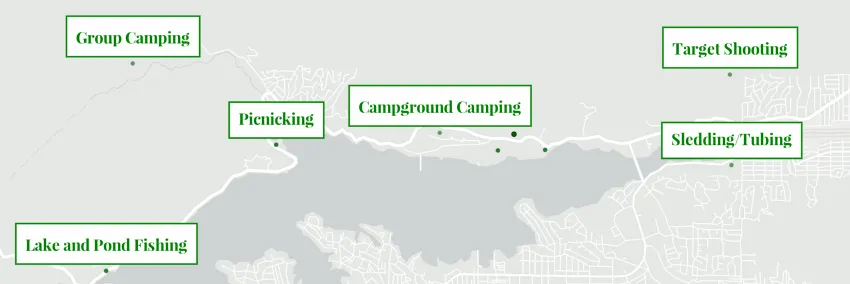
Clustering and binning maximum scale
You can now disable clustering and binning visualizations when the user zooms beyond a given maxScale. This is useful for apps where the user is required to zoom to a large scale where the clustering or binning configuration is no longer needed and individual point locations should display.
The Clustering - generate suggested configuration sample demonstrates this behavior.

Sort features drawn in view based on unique values
UniqueValueRenderer added the orderByClassesEnabled property. When enabled, this sorts the order of features in the view so they match the order defined for the unique values in the legend.
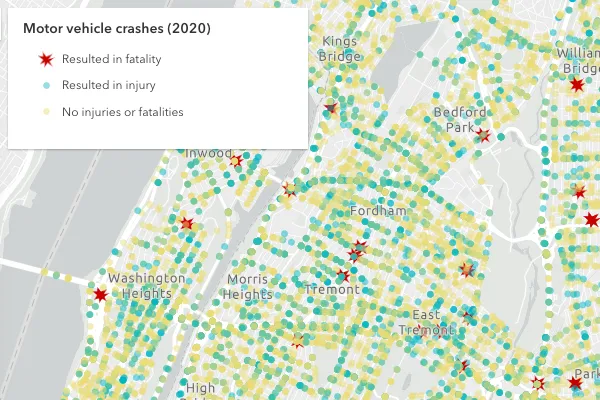
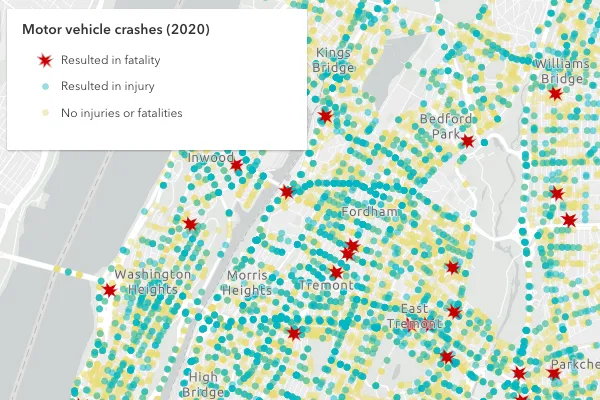
This is useful for cases where you want to display higher priority features on top of features with a lower priority. The Sort features by legend order sample demonstrates this by rendering car crash locations in three categories, crashes that resulted in:
- fatalities
- injuries
- no injuries or fatalities
Without controlling how these features are drawn in the view, the more important features (fatalities) would be mostly hidden by features with a lesser priority. By setting uniqueValueRenderer.orderByClassesEnabled = true, the view more appropriately renders the higher priority features on top of lesser priority features.
| Default order | Order by classes enabled |
|---|---|
 |  |
3D updates
Snapping in 3D measurement tools

Accurately measure lengths and areas of, for example, building roofs and facades. Direct line and area measurements now snap to features and 3D objects in your scene. Snapping is enabled by default and can be toggled by holding the Control key.
All tools that rely on snapping in 3D scenes benefit from improved hints, making it easier to snap to draped features or complex BIM data.
Explore the buildings of San Francisco using the updated Measurement in 3D sample.
Voxel layer popups and interactive slice
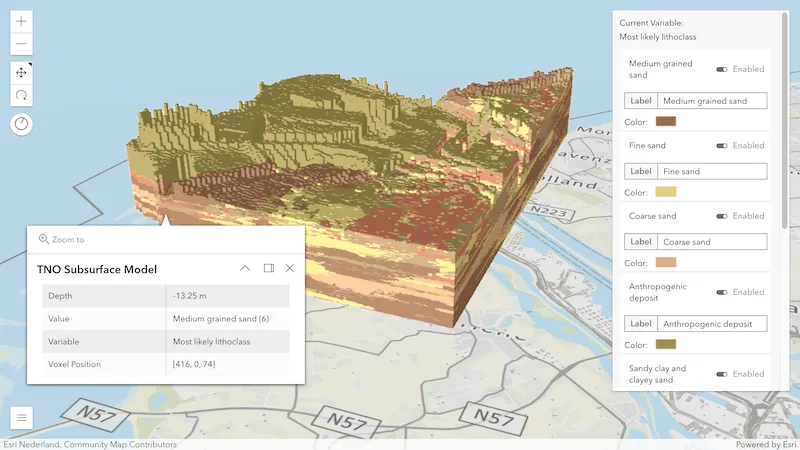
Explore the properties of individual voxels by enabling popups on your voxel layer. The popup shows attributes value, variable and voxel position, and if available also depth and time. Added support for the Slice widget allows you to interactively look inside your dataset and select any voxel.
Try out the new web-based VoxelLayer capabilities with a range of new samples.
Improved terrain

Experience improved terrain with enhanced shading and increased resolution for all quality modes. Besides additional contrast, the shading added in 4.25 has been intensified by visualizing the terrain with more detailed geometry. This additional information on the client comes without performance impact thanks to various optimizations in the terrain rendering.
Layer updates
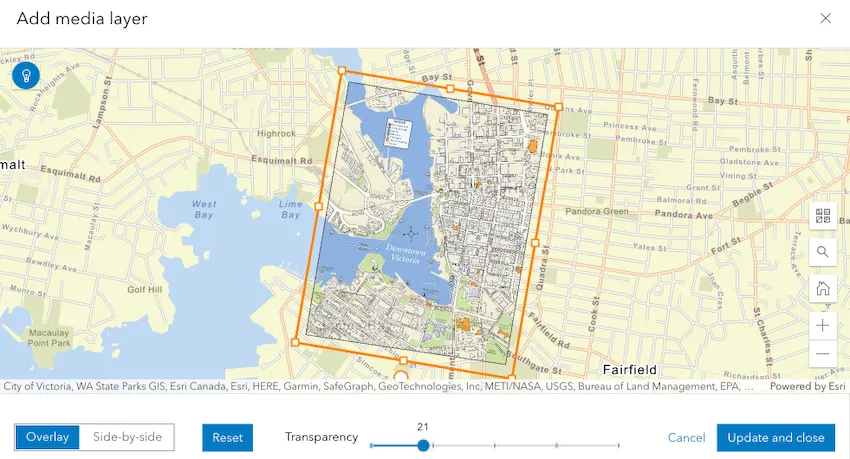
MediaLayer authoring experience
We added support for an authoring experience for MediaLayer in the Map Viewer, allowing you to add media to your map, adjust the control points, resize your image, and save it to a WebMap.
Process pixels with client-side raster functions
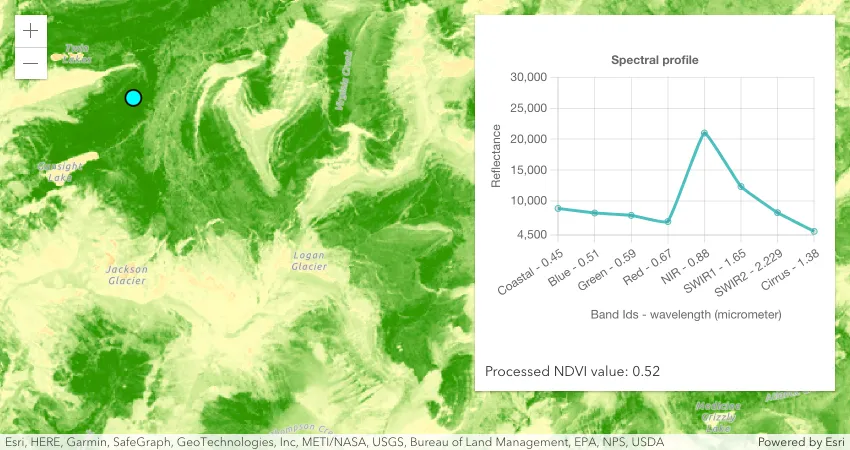
ImageryTileLayer now supports client-side raster functions (released in beta). The client-side raster functions are operations that apply processing directly to the source image pixels. The calculations are only applied to the source pixels that are visible in the map as you pan and zoom within the map. In upcoming releases, we will continue to add more functions and make the public API easier to work with.
The following sample demonstrates how you can use a client-side NDVI raster function to quantify vegetation greenness and use the Colormap raster function to display the result.
ImageryLayer mensuration
ImageryLayer now supports various mensuration operations. You can call measureAreaAndPerimeter(), measureDistanceAndAngle(), measureHeight(), and measurePointOrCentroid() methods to take various measurements on an image service.
StreamLayer updates
We added many new properties and methods this release that should improve your experience working with StreamLayers:
- The sendMessageToSocket() method can be used to send a message over the websocket to the server.
- The StreamLayerView.message-received event fires when the layer view receives a new message sent to the websocket connection.
- The pause() and resume() methods on StreamLayerView can be used to pause and resume the connection.
Users now can create a client-side StreamLayer by taking advantage of the sendMessageToClient() method. To create a client-side layer, one must provide all properties required to create the StreamLayer schema. Then, call sendMessageToClient() to add, remove, or update features.
Check out this sample for an example.
KnowledgeGraphLayer
KnowledgeGraphLayer (released in beta) is a new layer type for visualizing data from a knowledgeGraphService on a map. A KnowledgeGraphLayer is a composite layer with sublayers for spatial and non-spatial entity and relationship types. Spatial sublayers can be used with renderers, have configured popups and used in other spatial analysis. A KnowledgeGraphLayer can only be added to an instance of a map. Currently, it cannot be saved as an ArcGIS Enterprise Portal item, used in an web map or added as a layer in Map Viewer.
SubtypeGroupLayer rotation visual variables
SubtypeGroupLayer added support for the RotationVariable visual variable. Support for ColorVariable, OpacityVariable, and SizeVariable will be coming at a future release.
Widget updates
Popup
Select feature in related records popup
The new Select feature action button within RelationshipContent provides a way to highlight and zoom to the selected related feature while also opening the related feature’s popup.
Popup chart colors reflect renderer colors

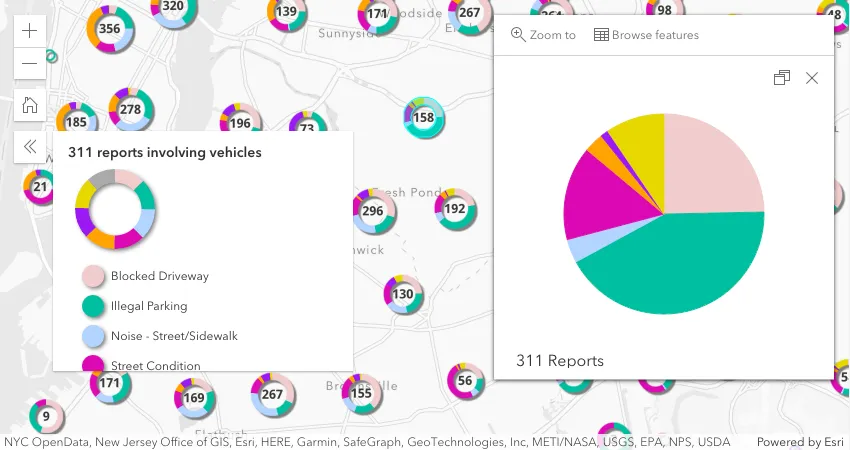
Popup chart colors now automatically respect feature reduction renderer colors when visualizing data with specific renderers. This is supported for binning with the predominance, dot density, and the pie chart renderers, along with clustering with the pie chart renderer.
Sketch
The Sketch widget added a duplicate() method that duplicates graphic(s) in an update workflow and adds the new graphic copies to the widget’s GraphicsLayer. The widget displays a duplicate (or copy) button when a single or multiple graphics are selected and in an update workflow. The Graphic attributes, geometry, and symbol properties are copied over to the new graphics.

Editor
The Editor was updated to support selecting features that do not have update capabilities, e.g. allowedWorkflows = ["create", "delete"]. Prior to this release, the UI’s select tool would not become enabled to support feature selection, even if the underlying data supported these operations. This recent update was necessary to be able to select and delete a feature. In addition, this update was needed for workflows where editing or creating attachments was a requirement.
FeatureForm
The FeatureForm widget was updated to make use of Calcite’s Date Picker and Time Picker components.
Legend
- We added sendMessageToClient() and sendMessageToSocket() methods on StreamLayer. Newly added methods can be used to send client-side messages or send a message over the websocket to the server.
- We also added StreamLayerView.message-received event that fires in response to when the layer view receives a new message sent to the websocket connection.
The field alias is no longer displayed in the Legend widget by default for UniqueValueRenderer.
Set the legendOptions
titleto the field alias if needed.
Utility network
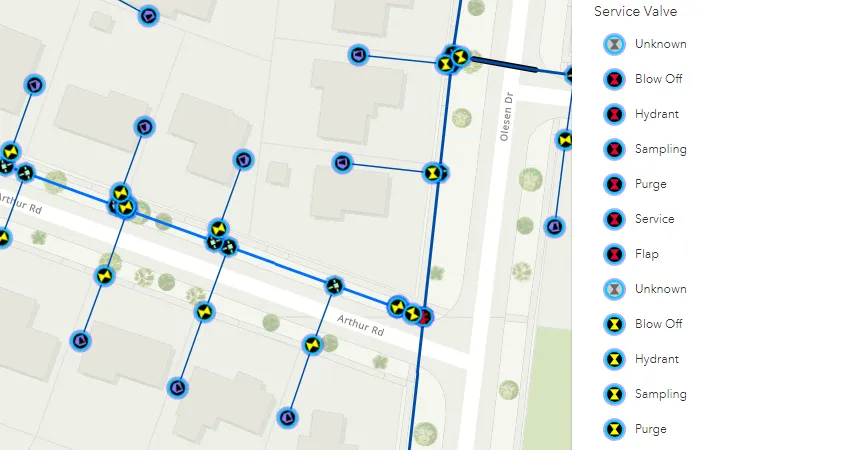
The UtilityNetwork added the ability to validate a network’s topology with the synchronous validateTopology() and asynchronous submitTopologyValidationJob() methods.
UtilityNetworkAssociations widget
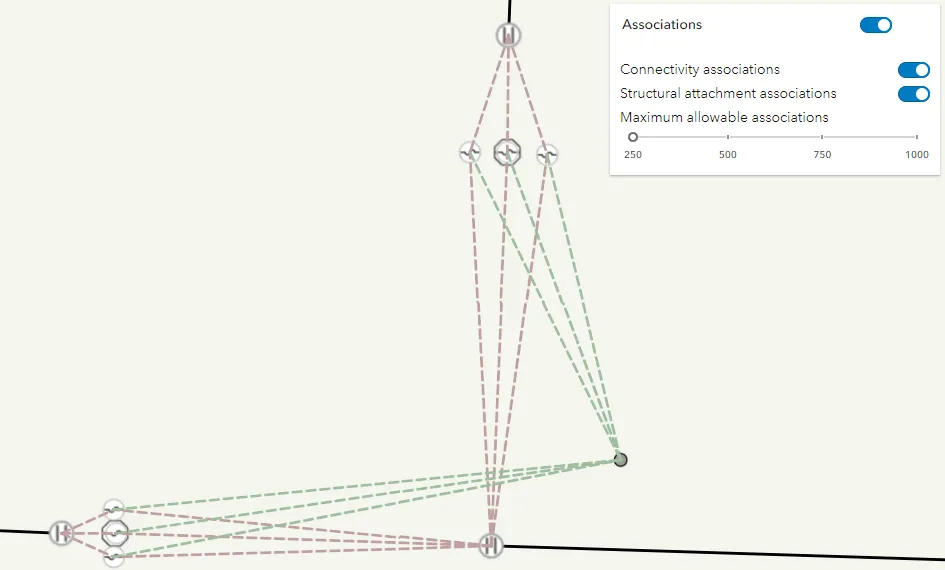
The new UtilityNetworkAssociations widget allows users to query and visualize the associations of a utility network within the current extent of the view. The widget supports viewing connectivity and structural attachment associations.
By default, a user can manually refresh the associations after an extent change, but they can also be refreshed automatically when a user pans or zooms the map by setting the autoRefreshAssociations property to true.
To allow users to adjust the number of maxAllowableAssociations, you can display the max allowable associations slider within the widget.
If the number of associations queries exceeds the value set for maxAllowableAssociations, then the server will not return any associations.
CIMSymbol updates
At this release, we made the following enhancements to CIMSymbol:
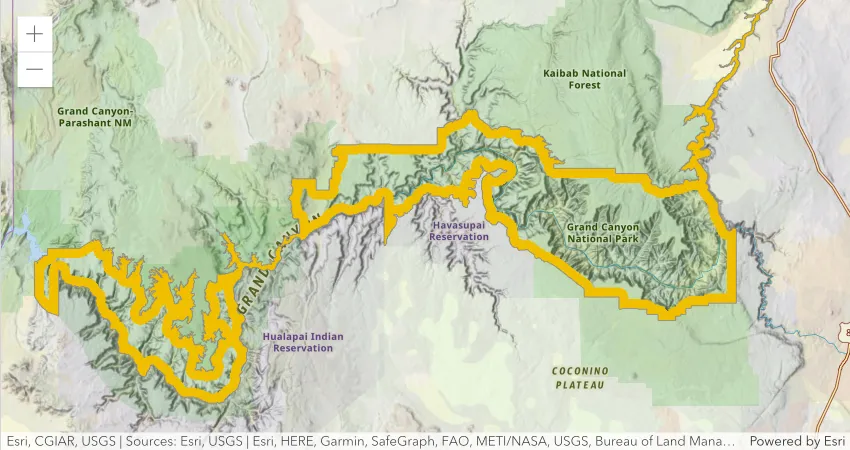
- Introduced support for CIMGeometricEffectDonut, which creates a dynamic polygon ring of a specified width in relation to the outline of polygon features. The example below uses a CIMPolygonSymbol with the donut effect to visualize the boundary of Grand Canyon National Park.
- Added support for animated picture markers placed within a polygon
- Added support for primitive overrides on marker placement properties
- Fixed bugs and improved performance of other geometric effects
Print non-spatial tables
We added a new property to the PrintTemplate to allow users to print tables using the print
and PrintViewModel.print() methods. When
PrintTemplate.includeTables is true, tables will be
included in the printout request. A table is a non-spatial dataset in a feature service or map service. This is only applicable
to print templates that are configured to support tables.
Downloadable samples using ES modules
ES module (ESM) samples are being added to the SDK that provide the same functionality as the existing AMD samples. However, the ESM samples use @arcgis/core and are available as a downloadable Vite.js project that can be installed and built locally using NPM. ESM works with most modern JavaScript frameworks and module bundlers without the need for additional loaders or specialized configurations. Visit the Sample page for the latest list.
Added classes, properties, methods, events
Complete list of added Classes, Properties, Methods, Events
- esri/layers/KnowledgeGraphLayer
- esri/layers/support/rasterFunctionConstants
- esri/networks/support/TopologyValidationJobInfo
- esri/rest/knowledgeGraph/SearchIndex
- esri/rest/knowledgeGraph/ServiceDefinition
- esri/rest/networks/support/ValidateNetworkTopologyParameters
- esri/rest/support/ImageAreaParameters
- esri/rest/support/ImageAreaResult
- esri/rest/support/ImageDistanceParameters
- esri/rest/support/ImageDistanceResult
- esri/rest/support/ImageHeightParameters
- esri/rest/support/ImageHeightResult
- esri/rest/support/ImagePointParameters
- esri/rest/support/ImagePointResult
- esri/widgets/UtilityNetworkAssociations
- esri/widgets/UtilityNetworkAssociations/UtilityNetworkAssociationsViewModel
esri/geometry/SpatialReference- Added properties: metersPerUnit, unit
esri/layers/StreamLayer- Added methods: sendMessageToClient, sendMessageToSocket
- Added methods: findSublayerForFeature, loadAll
esri/layers/support/SubtypeSublayer- Added properties: effectiveEditingEnabled, objectIdField, spatialReference
- Added methods: addAttachment, deleteAttachments, get, queryAttachments, updateAttachment
esri/layers/VoxelLayer- Added properties: legendEnabled, popupEnabled
esri/rest/knowledgeGraph/DataModel- Added properties: arcgisManaged, identifierInfo, searchIndexes
esri/symbols/support/symbolUtils- Added methods: renderPieChartPreviewHTML, renderRelationshipRampPreviewHTML
esri/views/layers/OGCFeatureLayerView- Added properties: highlightOptions, maximumNumberOfFeatures, maximumNumberOfFeaturesExceeded
esri/views/layers/StreamLayerView- Added property: highlightOptions to
esri/views/layers/StreamLayerView - Added methods: pause, resume
- Added event: message-received to
esri/views/layers/StreamLayerView
- Added property: highlightOptions to
esri/webmap/Bookmark- Added properties:
attachmentsOnCreateEnabledandattachmentsOnUpdateEnabledto Editor.layerInfos. - Added property:
coverageInfoto esri/layers/WCSLayer - Added property:
effectiveCapabilitiesto esri/layers/FeatureLayer, esri/layers/SubtypeGroupLayer - Added property:effectiveEditingEnabledto esri/layers/FeatureLayer, esri/layers/SubtypeGroupLayer, esri/layers/support/SubtypeSublayer - Added property:
endPointsto esri/rest/knowledgeGraph/RelationshipType - Added property:
errorsto esri/widgets/BasemapLayerList.visibleElements, esri/widgets/LayerList.visibleElements - Added property:
highlightOptionsto esri/views/layers/CSVLayerView, esri/views/layers/FeatureLayerView, esri/views/layers/GeoJSONLayerView, esri/views/layers/GraphicsLayerView, esri/views/layers/ImageryLayerView, esri/views/layers/OGCFeatureLayerView, esri/views/layers/StreamLayerView, esri/views/layers/WFSLayerView - Added property:
httpStatusto esri/request.RequestResponse - Added property:
iconClassto esri/widgets/support/SnappingControls - Added property:
idsFilterto esri/rest/knowledgeGraph/GraphSearchStreaming - Added property:
includeTablesto esri/rest/support/PrintTemplate - Added property:
isOrgItemto esri/portal/PortalItem - Added property:
maxScaleto esri/layers/support/FeatureReductionBinning, esri/layers/support/FeatureReductionCluster - Added property:
orderByClassesEnabledto esri/renderers/UniqueValueRenderer - Added property:
progressto esri/rest/support/JobInfo - Added property:
rasterFunctionto esri/layers/ImageryTileLayer - Added property:
roleto esri/rest/knowledgeGraph/GraphProperty - Added property:
sketchTooltipControlsto esri/widgets/Editor.visibleElements - Added method:
duplicateto esri/widgets/Sketch, esri/widgets/Sketch/SketchViewModel - Added method:
findSublayerForFeatureto esri/layers/SubtypeGroupLayer - Added method:
fromJSONto esri/webmap/Bookmark - Added method:
loadAllto esri/layers/SubtypeGroupLayer, esri/layers/TileLayer - Added method:
measureAreaAndPerimeterto esri/layers/ImageryLayer, esri/rest/imageService - Added method:
measureDistanceAndAngleto esri/layers/ImageryLayer, esri/rest/imageService - Added method:
measureHeightto esri/layers/ImageryLayer, esri/rest/imageService - Added method:
measurePointOrCentroidto esri/layers/ImageryLayer, esri/rest/imageService - Added method:
queryAttachmentsto esri/layers/support/Sublayer, esri/layers/support/SubtypeSublayer - Added method:
submitTopologyValidationJobto esri/networks/Network, esri/networks/UtilityNetwork - Added method:
toJSONto esri/webmap/Bookmark - Added method:
validateTopologyto esri/networks/Network, esri/networks/UtilityNetwork
Deprecated classes, properties, methods, events
View Popup autocasting deprecation
In a continuous effort to optimize the performance of the API, more specifically the load time, the decision was made to stop bundling the Popup with the MapView and SceneView. The Popup widget receives new features regularly, such as when browsing related records. Each new feature added to the popup widget increases the amount of built code and size of the widget that is being sent to the web browser. For example, the Popup module, which is bundled with the MapView, represents around 50% of the size of the bundle.
In a future release, the Popup widget loading will be deferred until the view is ready and will only be loaded if there are layers with a popup configured since it is only useful once content is displayed on the view. This will not disturb the user experience and the popup will still show up when the end user clicks on popup enabled content.
If you are interested in testing this optimization, make sure to check out the early access release description in the CHANGELOG, where we will provide more details and strategies to upgrade your code as we get closer to the next release.
Complete list of deprecated Classes, Properties, Methods, Events
The following are deprecated and will be removed in a future release:
- Compatibility with implementations that don’t support async/await at runtime, within AMD modules, is deprecated since version 4.25. For example, Angular applications using esri-loader will need to migrate from AMD modules to using @arcgis/core ES modules.
CreateWorkflowdeprecated since version 4.23. Use CreateFeaturesWorkflow instead.CreateWorkflowData.editsdeprecated since 4.23. Use CreateFeaturesWorkflow.pendingFeatures to access edits made to the workflow data.CreateWorkflowDatadeprecated since version 4.23. Use CreateFeaturesWorkflowData instead.Directions.routeServiceUrldeprecated since version 4.24. Use url from layer instead.Directions.routeSymboldeprecated since version 4.24. Use directionLines from layer instead.Directions.stopSymbolsdeprecated since version 4.24. Use RouteStopSymbols from layer instead.DirectionsViewModel.highlightSegmentdeprecated since version 4.24. Use highlight instead.DirectionsViewModel.routeServiceUrldeprecated since version 4.24. Use url from layer instead.DirectionsViewModel.routeSymboldeprecated since version 4.24. Use directionLines from layer instead.DirectionsViewModel.stopsdeprecated since version 4.24. Use stops from layer instead.DirectionsViewModel.stopSymbolsdeprecated since version 4.24. Use RouteStopSymbols from layer instead.- Editor.startCreateWorkflowAtFeatureCreation deprecated since version 4.23. Instead use startCreateFeaturesWorkflowAtFeatureCreation
- Editor.startCreateWorkflowAtFeatureEdit deprecated since 4.23
- Editor.startCreateWorkflowAtFeatureTypeSelection deprecated since version 4.23. Instead use startCreateFeaturesWorkflowAtFeatureTypeSelection instead.
- Editor.useDeprecatedCreateWorkflow deprecated since version 4.23. Although new at 4.23, this property was introduced to help migrate from the legacy
CreateWorkflowto the updated CreateFeaturesWorkflow. OnceCreateWorkflowis fully removed, this property will no longer be necessary. - EditorViewModel.startCreateWorkflowAtFeatureCreation deprecated since version 4.23. Instead use startCreateFeaturesWorkflowAtFeatureCreation.
- EditorViewModel.startCreateWorkflowAtFeatureEdit deprecated since 4.23
- EditorViewModel.startCreateWorkflowAtFeatureTypeSelection deprecated since version 4.23. Instead use startCreateFeaturesWorkflowAtFeatureTypeSelection.
EventAttachedCallback.EventAttachedCallbackdeprecated since version 4.24. Use reactiveUtils.ReactiveListenerChangeCallback() instead.- FeatureTable.clearHighlights deprecated since version 4.25. Use highlightIds.removeAll() instead.
- FeatureTable.clearSelection deprecated since version 4.25. Use highlightIds.removeAll() instead.
- FeatureTable.deselectRows deprecated since 4.25. Use highlightIds.remove() instead.
- FeatureTable.fieldConfigs deprecated since version 4.24. Use FieldColumnTemplate via the FeatureTable’s tableTemplate.
- FeatureTable.highlightOnRowSelectEnabled deprecated since version 4.25. Use highlightEnabled instead.
- FeatureTable.selection-change deprecated since version 4.25. Listen for changes on highlightIds instead.
- FeatureTable.selectRows deprecated since 4.25. Use highlightIds.add() instead.
- FeatureTableViewModel.clearHighlights deprecated since version 4.25. Use highlightEnabled instead.
- FeatureTableViewModel.clearSelection deprecated since version 4.25. Use highlightEnabled instead.
- FeatureTableViewModel.fieldConfigs deprecated since version 4.24. Use FieldColumnTemplate via the FeatureTable’s tableTemplate.
- FeatureTableViewModel.highlightOnRowSelectEnabled deprecated since version 4.25. Use highlightEnabled instead.
- FeatureTableViewModel.selectRows deprecated since 4.25. Use highlightIds.add() instead.
- FieldColumn.config deprecated since version 4.24. Use FieldColumnTemplate via the FeatureTable’s tableTemplate.
FieldColumnConfigdeprecated since version 4.24. Use FieldColumnTemplate via the FeatureTable’s tableTemplate.- FieldElement.editable deprecated since version 4.26. Use
editableExpressioninstead. AssigningeditableExpressionvalues of"true"and"false"will have the same effect as assigningtrueandfalsetoeditable. FieldGroupConfig.visibilityExpressiondeprecated since version 4.23. Set fields via the GroupElement.visibilityExpressionFieldGroupConfigdeprecated since version 4.23. Set field groupings via the GroupElement.esri/layers/support/ImageParametersdeprecated since version 4.24. Use ImageParameters instead.HeatmapRenderer.blurRadiusis deprecated since version 4.24. Use radius instead.HeatmapRenderer.maxPixelIntensityis deprecated since version 4.24. Use maxDensity instead.HeatmapRenderer.minPixelIntensityis deprecated since version 4.24. Use minDensity instead.InputFieldGroup.visibilityExpressiondeprecated Since 4.23. Use groupElement.visibilityExpression instead.- Lighting deprecated since version 4.24. Use SunLighting instead.
PausableWatchHandle.PausableWatchHandledeprecated since version 4.24.- PromisedWatchHandle.PromisedWatchHandle deprecated since version 4.24. Use Promise instead.
- promiseUtils.create deprecated since version 4.24. Use Promise instead.
- The
allowAttachmentsproperty within Editor.layerInfos is deprecated at 4.25. Use eitherattachmentsOnCreateEnabledorattachmentsOnUpdateEnabledinstead. - UtilityNetwork.rulesTableId deprecated since version 4.25. Use networkSystemLayers.rulesTableId instead.
- UtilityNetwork.rulesTableUrl deprecated since version 4.25. Use networkSystemLayers.rulesTableUrl instead.
- UtilityNetwork.subnetworksTableId deprecated since version 4.25. Use networkSystemLayers.subnetworksTableId instead.
- UtilityNetwork.subnetworksTableUrl deprecated since version 4.25. Use networkSystemLayers.subnetworksTableUrl instead.
- VoxelVariable deprecated since 4.25. Use VoxelVariable instead.
- VoxelVolumeStyle deprecated since 4.25. Use VoxelVolumeStyle instead.
watchUtils.initdeprecated since 4.24. Use reactiveUtils.watch() instead.watchUtils.ondeprecated since 4.24. Use reactiveUtils.on() instead.watchUtils.oncedeprecated since 4.24. Use reactiveUtils.once() instead.watchUtils.pausabledeprecated Since 4.24.watchUtils.watchdeprecated since 4.24. Use reactiveUtils.watch() instead.watchUtils.whendeprecated since 4.24. Use reactiveUtils.when() instead.watchUtils.whenDefineddeprecated since 4.24. Use reactiveUtils.when() instead.watchUtils.whenDefinedOncedeprecated since 4.24. Use reactiveUtils.whenOnce() instead.watchUtils.whenEqualdeprecated since 4.24. Use reactiveUtils.when() insteadwatchUtils.whenEqualOncedeprecated since 4.24. Use reactiveUtils.whenOnce() instead.watchUtils.whenFalsedeprecated since 4.24. Use reactiveUtils.when() instead.watchUtils.whenFalseOncedeprecated since 4.24. Use reactiveUtils.whenOnce() instead.watchUtils.whenNotdeprecated since 4.24. Use reactiveUtils.when() instead.watchUtils.whenNotOncedeprecated since 4.24. Use reactiveUtils.whenOnce() instead.watchUtils.whenOncedeprecated since 4.24. Use reactiveUtils.whenOnce() instead.watchUtils.whenTruedeprecated since 4.24. Use reactiveUtils.when() instead.watchUtils.whenTrueOncedeprecated since 4.24. Use reactiveUtils.whenOnce() instead.watchUtils.whenUndefineddeprecated since 4.24. Use reactiveUtils.when() instead.watchUtils.whenUndefinedOncedeprecated since 4.24. Use reactiveUtils.whenOnce() instead.watchUtilsdeprecated since version 4.24. Use reactiveUtils instead.
List of deprecated TypeScript types
The following are deprecated from the public TypeScript definitions and will be removed in a future release.
IPromisedeprecated since version 4.25. Use nativePromiseinstead.- Instances of
*Constructordeprecated since 4.25. Update usage of__esri.ModuleConstructortotypeof __esri.Module, orimportthe module from typings and change the type assignment totypeof Module.
Breaking changes
- ImageryTileLayer’s default title is now created from its URL like other layers instead of the name property from the service’s root resource.
- Setting Editor.layerInfos
updateEnabledtofalsewill not disable the ability todeletefeatures. Prior to this release, settingupdateEnabledtofalsewould prevent both updates and deletes on a feature. Now if deletes are needed, it is necessary to also setdeleteEnabledtotrue. - The default value of VoxelIsosurface.colorLocked changed from
truetofalse. - The Editor widget’s UI has been slightly updated to show snapping settings using an accordion component rather than a popover.
- The
globalIdsFilterproperty of GraphSearchStreaming was replaced withidsFilter. - The networkService.fetchServiceDescription() method now returns an object with a
defaultTravelModeproperty of type TravelMode instead of type string. - Retired WebGL1: Loading a SceneView now requires a device which supports WebGL2.
The following classes, methods, properties and events have been deprecated for at least 2 releases and have now been removed from the API:
| Class/Property/Method/Event | Alternate option | Version deprecated |
|---|---|---|
esri/widgets/Slice/SlicePlane | esri/analysis/SlicePlane | 4.23 |
Knowledge Graph beta changes
The knowledgeGraphService remains in beta. Capabilities in version 4.26 are only supported against ArcGIS Enterprise 11.1 and later. To access a knowledgeGraphService on ArcGIS Enterprise 11.0 and earlier, use version 4.25.
In 4.26/Enterprise 11.1, the data model and service definition of knowledge graph services were updated.
With the exception of GraphSearchStreaming.globalIdsFilter, this change will not break client-side code written using the methods for knowledgeGraphService.
The table below lists the knowledge graph properties that have been removed at this release:
| Property | Alternate Option |
|---|---|
KnowledgeGraph.dataModel | fetchKnowledgeGraph() returns the data model |
GraphSearchStreaming.globalIdsFilter | idsFilter |
GraphProperty.searchable | SearchIndex |
RelationshipType.destinationEntityTypes and RelationshipType.originEntityTypes | RelationshipType.endpoints |
RelationshipType.strictOrigin and RelationshipType.strictDestination | none |
Bug fixes and enhancements
- BUG-000135050: Fixed an issue where Popups would not display attachments when sublayers on a MapImageLayers had AttachmentsContent configured. This only applies to map services on ArcGIS Enterprise version 10.8.1 and above.
- BUG-000146636: Fixed an issue where using the Zoom To action in popups would zoom passed the selected geometry’s extent.
- BUG-000153564: Fixed an issue where VectorTileLayer intermittently stopped drawing some tiles at certain zoom levels.
- BUG-000153928: Fixed an issue where Area Measurement failed if the second point was added via a double-click instead of single click.
- BUG-000154063: Fixed an issue in the FeatureTable widget where edits would periodically not save correctly after quickly scrolling through table records.
- BUG-000154321: Fixed an issue where LineOfSightViewModel
observerandtargetsreturned z-values in varying elevation modes. Now all z-positions are returned as absolute values. - BUG-000154335: Fixed an issue in the FeatureTable widget where only the default fields were displayed for SceneLayer with associated FeatureLayer.
- BUG-000154436: Fixed an issue in the FeatureTable widget where hiding a child column contained within a grouped column would not work correctly. This has been fixed and these contained columns can be hidden when programmatically setting their visibility to
false. - BUG-000154467: Fixed an issue where null or invalid values were returned in form expressions when the calculation was dependent on the field currently being calculated.
- BUG-000154629: Fixed an issue where DynamicLayer was not honoring transparency.
- BUG-000154645: Fixed an issue where calling FeatureLayer.save() resulted in bad JSON if the layer had a renderer with UniqueValueGroups containing values with the less-than sign (<) or the greater-than sign (>).
- BUG-000151127: Fixed an issue where a WebScene with 3D symbols does not display if the portal URL is set to a different portal.
- Esri Community - 1231460: Fixed an issue where users aren’t able to set a container coming from another context (iframe, window).
- Esri Community - 1240962: Fixed a regression in WebTileLayer where
fetchTile()could not be overridden when creating a custom subclass. - Esri Community - 1241411: Fixed an issue where an AbortError thrown when deleting a layer after changing its definitionExpression.
- Esri Community - 1242600: Fixed an issue where the MapView.takeScreenshot() was not taking high resolution screenshots.
- Esri Community - 1248727: Fixed a Dutch translation issue with the Search widget results popup title.
- Esri Community - 1250753: Fixed an issue where StreamLayer custom parameters were not updated at runtime.
- Fixed an issue where an ImageryLayer was displaying a white background around the exported image causing layers underneath to not be visible.
- Fixed an issue where MediaContent charts in a popup displaying information from a relationship were only showing one related feature.
- Fixed an issue where MediaContent charts in a popup were not drawing when displaying information from a related table.
- Fixed an issue where two
queryAttachmentsrequests were sent to the service when selecting a feature that had AttachmentsContent in its Popup. - ENH-000121116: Enhanced the TextSymbol class to allow backgroundColor, borderLineColor, and borderLineSize properties to now work with FeatureLayer.
- ENH-000152699: Added support for ImageryTileLayer referencing a tiled image services with LODs that are not power of two.
- ENH-000155208: Enhanced TileLayer to highlight the selected feature when displaying its Popup.
- Enhanced the Directions widget with improved summary and per-turn distances.
- MediaLayer.source can now be an individual ImageElement or VideoElement. The source can still be a collection of image and video elements.
- Enhanced the SpatialReference by adding unit to return the unit of measure for the spatial reference and metersPerUnit to easily convert from one spatial reference unit to another.
Additional packages
Version 4.26 of the ArcGIS Maps SDK for JavaScript uses ArcGIS Arcade 1.21 (since 4.26).
Version 4.26 of the ArcGIS Maps SDK for JavaScript uses Calcite Design System, version 1.0.7.
How to access the SDK
- The API library is available on both CDN and npm, read more at Get started.
- For supported versions, you can also download both the documentation and the API library. These downloads are typically available 3-4 weeks after release.