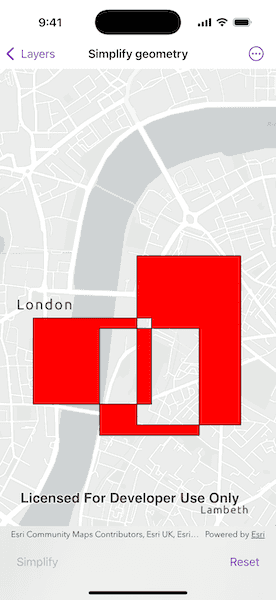
Simplify a polygon with a self-intersecting geometry.
Use case
A user may draw a polygon which is self-intersecting or contains incorrect ring orientations. The geometry must be simplified before it can be saved to a geodatabase.
How to use the sample
Click the 'Simplify' button to simplify the geometry. Click 'Reset' to reset to the original geometry.
How it works
- Check if the polygon geometry needs to be simplified using
GeometryEngine.isSimple(_:). - Simplify the polygon's geometry using
GeometryEngine.simplify(_:).
Relevant API
- Geometry
- GeometryEngine
Additional information
The concept of topological simplicity is different than geometry generalization, where points are removed from polygons or lines to create a more generalized result while preserving overall shape. See the 'Densify and Generalize' sample for comparison.
Tags
geometry, polygon, simplify, spatial operations, topology
Sample Code
SimplifyGeometryView.swift
// Copyright 2025 Esri
//
// Licensed under the Apache License, Version 2.0 (the "License");
// you may not use this file except in compliance with the License.
// You may obtain a copy of the License at
//
// https://www.apache.org/licenses/LICENSE-2.0
//
// Unless required by applicable law or agreed to in writing, software
// distributed under the License is distributed on an "AS IS" BASIS,
// WITHOUT WARRANTIES OR CONDITIONS OF ANY KIND, either express or implied.
// See the License for the specific language governing permissions and
// limitations under the License.
import ArcGIS
import SwiftUI
struct SimplifyGeometryView: View {
/// A map with a light gray basemap style.
@State private var map = Map(basemapStyle: .arcGISLightGray)
/// A Boolean value indicating whether the geometry has been simplified.
@State private var isSimplified = false
/// The graphics overlay for the original polygon.
@State private var originalOverlay = GraphicsOverlay(graphics: [makePolygonGraphic()])
/// The graphics overlay for the simplified geometry.
@State private var resultOverlay = GraphicsOverlay()
var body: some View {
MapViewReader { mapView in
MapView(map: map, graphicsOverlays: [originalOverlay, resultOverlay])
.task {
// Center the map on London.
await mapView.setViewpointCenter(
Point(
x: -13150,
y: 6710327,
spatialReference: .webMercator
),
scale: 25000
)
}
}
.toolbar {
ToolbarItemGroup(placement: .bottomBar) {
Button("Simplify", role: .cancel) {
simplifyGeometry()
}
.disabled(isSimplified)
Button("Reset") {
// Clear the simplified overlay and reset state.
resultOverlay.removeAllGraphics()
isSimplified = false
}
.disabled(!isSimplified)
}
}
}
/// Checks to see whether the polygon geometry has been simplified, if not, simplifies the geometry and then displays it in filled red.
private func simplifyGeometry() {
guard let original = originalOverlay.graphics.first?.geometry,
!GeometryEngine.isSimple(original) else { return }
if let simplified = GeometryEngine.simplify(original) {
// Define a red-filled symbol for the simplified result.
let redSymbol = SimpleFillSymbol(style: .solid, color: .red, outline: .lineSymbol)
// Create a graphic from the simplified geometry and add it to the result overlay.
let resultGraphic = Graphic(geometry: simplified, symbol: redSymbol)
resultOverlay.addGraphic(resultGraphic)
// Set simplified state to true.
isSimplified = true
}
}
/// Creates a polygon geometry that can be simplified.
private static func makePolygonGraphic() -> Graphic {
let part1 = MutablePart(
points: [
Point(x: -13020, y: 6710130),
Point(x: -14160, y: 6710130),
Point(x: -14160, y: 6709300),
Point(x: -13020, y: 6709300),
Point(x: -13020, y: 6710130)
],
spatialReference: .webMercator
)
let part2 = MutablePart(
points: [
Point(x: -12160, y: 6710730),
Point(x: -13160, y: 6710730),
Point(x: -13160, y: 6709100),
Point(x: -12160, y: 6709100),
Point(x: -12160, y: 6710730)
],
spatialReference: .webMercator
)
let part3 = MutablePart(
points: [
Point(x: -12560, y: 6710030),
Point(x: -13520, y: 6710030),
Point(x: -13520, y: 6709000),
Point(x: -12560, y: 6709000),
Point(x: -12560, y: 6710030)
],
spatialReference: .webMercator
)
// Build the full polygon from all parts.
let polygonBuilder = PolygonBuilder(spatialReference: .webMercator)
polygonBuilder.parts.append(part1)
polygonBuilder.parts.append(part2)
polygonBuilder.parts.append(part3)
// Convert to a geometry and wrap it in a graphic with transparent fill.
let polygon = polygonBuilder.toGeometry()
let fillSymbol = SimpleFillSymbol(style: .solid, color: .clear, outline: .lineSymbol)
return Graphic(geometry: polygon, symbol: fillSymbol)
}
}
private extension Symbol {
static var lineSymbol: LineSymbol {
SimpleLineSymbol(style: .solid, color: .black, width: 1)
}
}
#Preview {
SimplifyGeometryView()
}