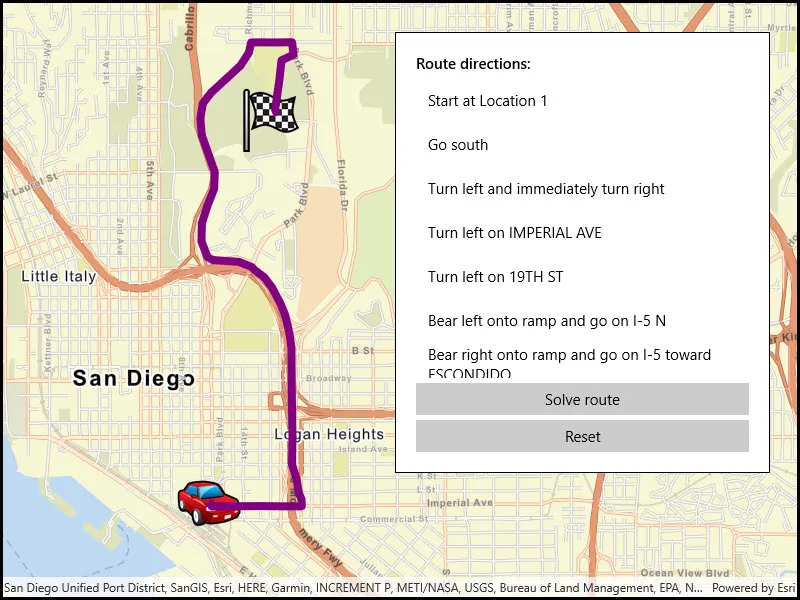
Display directions for a route between two points.
Use case
Find routes with driving directions between any number of locations. You might use the ArcGIS platform to create a custom network for routing on a private roads.
How to use the sample
For simplicity, the sample comes loaded with a start and end stop. You can click on the Find Route button to display a route between these stops. Once the route is generated, turn-by-turn directions are shown in a list.
How it works
- Create a
RouteTaskusing a URL to an online route service. - Generate default
RouteParametersusingrouteTask.CreateDefaultParametersAsync(). - Set
returnStopsandreturnDirectionson the parameters to true. - Add
Stops to the parametersstopscollection for each destination. - Solve the route using
routeTask.SolveAsync(routeParameters)to get aRouteResult. - Iterate through the result’s
Routes. To display the route, create a graphic using the geometry fromroute.RouteGeometry. To display directions, userouteDirectionManeuvers, and for eachDirectionManeuver, displayDirectionManeuver.DirectionText.
Relevant API
- DirectionManeuver
- Route
- RouteParameters
- RouteResult
- RouteTask
- Stop
Tags
directions, driving, navigation, network, network analysis, route, routing, shortest path, turn-by-turn
Sample code
// Copyright 2017 Esri.//// Licensed under the Apache License, Version 2.0 (the "License"); you may not use this file except in compliance with the License.// You may obtain a copy of the License at: http://www.apache.org/licenses/LICENSE-2.0//// Unless required by applicable law or agreed to in writing, software distributed under the License is distributed on an// "AS IS" BASIS, WITHOUT WARRANTIES OR CONDITIONS OF ANY KIND, either express or implied. See the License for the specific// language governing permissions and limitations under the License.
using Esri.ArcGISRuntime.Geometry;using Esri.ArcGISRuntime.Mapping;using Esri.ArcGISRuntime.Symbology;using Esri.ArcGISRuntime.Tasks.NetworkAnalysis;using Esri.ArcGISRuntime.UI;using System;using System.Collections.Generic;using System.Drawing;using System.Linq;
namespace ArcGIS.WinUI.Samples.FindRoute{    [ArcGIS.Samples.Shared.Attributes.Sample(        name: "Find route",        category: "Network analysis",        description: "Display directions for a route between two points.",        instructions: "For simplicity, the sample comes loaded with a start and end stop. You can click on the Find Route button to display a route between these stops. Once the route is generated, turn-by-turn directions are shown in a list.",        tags: new[] { "directions", "driving", "navigation", "network", "network analysis", "route", "routing", "shortest path", "turn-by-turn" })]    public partial class FindRoute    {        // List of stops on the route ('from' and 'to')        private List<Stop> _routeStops;
        // Graphics overlay to display stops and the route result        private GraphicsOverlay _routeGraphicsOverlay;
        // URI for the San Diego route service        private Uri _sanDiegoRouteServiceUri = new Uri("https://sampleserver7.arcgisonline.com/server/rest/services/NetworkAnalysis/SanDiego/NAServer/Route");
        // URIs for picture marker images        private Uri _checkedFlagIconUri = new Uri("https://static.arcgis.com/images/Symbols/Transportation/CheckeredFlag.png");
        private Uri _carIconUri = new Uri("https://static.arcgis.com/images/Symbols/Transportation/CarRedFront.png");
        public FindRoute()        {            InitializeComponent();            // Create the map, graphics overlay, and the 'from' and 'to' locations for the route            Initialize();        }
        private void Initialize()        {            // Define the route stop locations (points)            MapPoint fromPoint = new MapPoint(-117.15494348793044, 32.706506537686927, SpatialReferences.Wgs84);            MapPoint toPoint = new MapPoint(-117.14905088669816, 32.735308180609138, SpatialReferences.Wgs84);
            // Create Stop objects with the points and add them to a list of stops            Stop stop1 = new Stop(fromPoint);            Stop stop2 = new Stop(toPoint);            _routeStops = new List<Stop> { stop1, stop2 };
            // Picture marker symbols: from = car, to = checkered flag            PictureMarkerSymbol carSymbol = new PictureMarkerSymbol(_carIconUri);            PictureMarkerSymbol flagSymbol = new PictureMarkerSymbol(_checkedFlagIconUri);
            // Add a slight offset (pixels) to the picture symbols.            carSymbol.OffsetX = -carSymbol.Width / 2;            carSymbol.OffsetY = -carSymbol.Height / 2;            flagSymbol.OffsetX = -flagSymbol.Width / 2;            flagSymbol.OffsetY = -flagSymbol.Height / 2;
            // Create graphics for the stops            Graphic fromGraphic = new Graphic(fromPoint, carSymbol) { ZIndex = 1 };            Graphic toGraphic = new Graphic(toPoint, flagSymbol) { ZIndex = 1 };
            // Create the graphics overlay and add the stop graphics            _routeGraphicsOverlay = new GraphicsOverlay();            _routeGraphicsOverlay.Graphics.Add(fromGraphic);            _routeGraphicsOverlay.Graphics.Add(toGraphic);
            // Get an Envelope that covers the area of the stops (and a little more)            Envelope routeStopsExtent = new Envelope(fromPoint, toPoint);            EnvelopeBuilder envBuilder = new EnvelopeBuilder(routeStopsExtent);            envBuilder.Expand(1.5);
            // Create a new viewpoint apply it to the map view when the spatial reference changes            Viewpoint sanDiegoViewpoint = new Viewpoint(envBuilder.ToGeometry());            MyMapView.SpatialReferenceChanged += (s, e) => MyMapView.SetViewpoint(sanDiegoViewpoint);
            // Add a new Map and the graphics overlay to the map view            MyMapView.Map = new Map(BasemapStyle.ArcGISStreets);            MyMapView.GraphicsOverlays.Add(_routeGraphicsOverlay);        }
        private async void SolveRouteClick(object sender, Microsoft.UI.Xaml.RoutedEventArgs e)        {            try            {                // Create a new route task using the San Diego route service URI                RouteTask solveRouteTask = await RouteTask.CreateAsync(_sanDiegoRouteServiceUri);
                // Get the default parameters from the route task (defined with the service)                RouteParameters routeParams = await solveRouteTask.CreateDefaultParametersAsync();
                // Make some changes to the default parameters                routeParams.ReturnStops = true;                routeParams.ReturnDirections = true;
                // Set the list of route stops that were defined at startup                routeParams.SetStops(_routeStops);
                // Solve for the best route between the stops and store the result                RouteResult solveRouteResult = await solveRouteTask.SolveRouteAsync(routeParams);
                // Get the first (should be only) route from the result                Route firstRoute = solveRouteResult.Routes.First();
                // Get the route geometry (polyline)                Polyline routePolyline = firstRoute.RouteGeometry;
                // Create a thick purple line symbol for the route                SimpleLineSymbol routeSymbol = new SimpleLineSymbol(SimpleLineSymbolStyle.Solid, Color.Purple, 8.0);
                // Create a new graphic for the route geometry and add it to the graphics overlay                Graphic routeGraphic = new Graphic(routePolyline, routeSymbol) { ZIndex = 0 };                _routeGraphicsOverlay.Graphics.Add(routeGraphic);
                // Get a list of directions for the route and display it in the list box                IReadOnlyList<DirectionManeuver> directionsList = firstRoute.DirectionManeuvers;                DirectionsListBox.ItemsSource = directionsList;            }            catch (Exception ex)            {                await new MessageDialog2(ex.ToString(), "Error").ShowAsync();            }        }
        private void ResetClick(object sender, Microsoft.UI.Xaml.RoutedEventArgs e)        {            // Clear the list of directions            DirectionsListBox.ItemsSource = null;
// Remove the route graphic from the graphics overlay (only line graphic in the collection) int graphicsCount = _routeGraphicsOverlay.Graphics.Count; for (int i = graphicsCount; i > 0; i--) { // Get this graphic and see if it has line geometry Graphic g = _routeGraphicsOverlay.Graphics[i - 1]; if (g.Geometry.GeometryType == GeometryType.Polyline) { // Remove the graphic from the overlay _routeGraphicsOverlay.Graphics.Remove(g); } } } }}<UserControl x:Class="ArcGIS.WinUI.Samples.FindRoute.FindRoute" xmlns="http://schemas.microsoft.com/winfx/2006/xaml/presentation" xmlns:x="http://schemas.microsoft.com/winfx/2006/xaml" xmlns:esriUI="using:Esri.ArcGISRuntime.UI.Controls"> <Grid> <esriUI:MapView x:Name="MyMapView" /> <Border Style="{StaticResource BorderStyle}"> <StackPanel> <TextBlock Margin="0,0,0,5" FontWeight="SemiBold" Text="Route directions:" /> <ListView x:Name="DirectionsListBox" Height="300" HorizontalAlignment="Stretch"> <ListView.ItemTemplate> <DataTemplate> <TextBlock Text="{Binding DirectionText}" TextWrapping="Wrap" /> </DataTemplate> </ListView.ItemTemplate> </ListView> <Button Margin="0,5" HorizontalAlignment="Stretch" Click="SolveRouteClick" Content="Solve route" /> <Button HorizontalAlignment="Stretch" Click="ResetClick" Content="Reset" /> </StackPanel> </Border> </Grid></UserControl>